Internet
This category consists of articles published on Tweak And Trick related to internet and the World Wide Web (www).\

****Facebook Tricks****
1.Facebook tricks, tips & hack.
lmost half of all the sharing that happens online is done on Facebook. This in itself is testament enough that Facebook does the job of connecting people fairly well. However, there are some tips and tricks that can allow you to get more out of Facebook and this article contains a list of some of the best such Facebook tips.
 Stop Hackers on Facebook
Are you worried about hackers hacking your Facebook account and posting stuff you don't want them to? Just read the linked post to protect yourself from most basic hacks
Change Facebook's Theme
Are you bored with the default blue colored Facebook theme and want to get rid of it? Go change it to something super cool in Firefox.
Post an Empty/ Blank Status
Are you tired of constantly thinking new and interesting status updates for your Facebook friends? Then, post an empty status and show your friends that you denounce the thinking that if your status isn't cool, you aren't either. Just go to Facebook, hold Alt and press 0, 1, 7 and 3 respectively and click Post. This will post the null character as your status which basically is an empty space. Laptop users can do this after activating the Number Lock.
Subscribe to the RSS feed of your Notifications
Go to Facebook's notifications page and click on the RSS link to find the RSS feed containing all your recent notifications. You can then subscribe to this feed in any desktop based RSS reader to instantly know when a new notification occurs.
Change Facebook's Posted via text
Have you noticed that when you update your Facebook status from a mobile, Facebook adds a "Posted via Mobile" link at the bottom of it? You can change that to say hilarious things like "via Carrier Pigeon" or "via My Bedroom." To do this, just go to PostedVia, choose a delivery option and update your status or post to a friend's wall.
Know when friends Unfriend you
Facebook notifies you when someone adds you as a friend but Facebook does not notify you when someone unfriends you. If you wish to access this data, you can use Social Fixer Facebook extension, which will not only allow you to do this but a lot more too.

Update Facebook Status from Firefox
FireStatus is a Firefox addon that allows you to instantly update your Facebook status without having the need to visit Facebook again and again.

Use Dynamic Facebook Profile Links to Fool your Friends
This is a funny use of technology to have fun with your friends. Just say some mean things in your status and then include this link -> www.facebook.com/profile.php?=1233445566. This may look like a link to a specific person's Facebook profile but in reality, it redirects users to their own profile. This happens because of the missing 'id' parameter. You can change the numbers to anything you like.
 Find Exactly What you are looking for on Facebook
If you ever had trouble finding a friend or a specific post by one of your friend, you should definitely take a look at the Facebook page on searching. It will help you to get acquainted not only with how Facebook search works but also enable you to get the most out of it.
 Access Facebook Chat on Your Desktop
Have you ever wanted to chat with your Facebook friends without opening a web browser? Desktop based applications like Digsby and ChitChat can allow you to stay connected with all your friends even when you close your web browser. This is much similar to chatting with Yahoo! Messenger or Google Talk chat client.
Are you worried about hackers hacking your Facebook account and posting stuff you don't want them to? Just read the linked post to protect yourself from most basic hacks
Change Facebook's Theme
Are you bored with the default blue colored Facebook theme and want to get rid of it? Go change it to something super cool in Firefox.
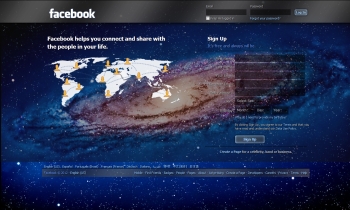 |
| Facebook Galaxy Theme |
Are you tired of constantly thinking new and interesting status updates for your Facebook friends? Then, post an empty status and show your friends that you denounce the thinking that if your status isn't cool, you aren't either. Just go to Facebook, hold Alt and press 0, 1, 7 and 3 respectively and click Post. This will post the null character as your status which basically is an empty space. Laptop users can do this after activating the Number Lock.
Subscribe to the RSS feed of your Notifications
Go to Facebook's notifications page and click on the RSS link to find the RSS feed containing all your recent notifications. You can then subscribe to this feed in any desktop based RSS reader to instantly know when a new notification occurs.
Change Facebook's Posted via text
Have you noticed that when you update your Facebook status from a mobile, Facebook adds a "Posted via Mobile" link at the bottom of it? You can change that to say hilarious things like "via Carrier Pigeon" or "via My Bedroom." To do this, just go to PostedVia, choose a delivery option and update your status or post to a friend's wall.
Know when friends Unfriend you
Facebook notifies you when someone adds you as a friend but Facebook does not notify you when someone unfriends you. If you wish to access this data, you can use Social Fixer Facebook extension, which will not only allow you to do this but a lot more too.
Update Facebook Status from Firefox
FireStatus is a Firefox addon that allows you to instantly update your Facebook status without having the need to visit Facebook again and again.
Use Dynamic Facebook Profile Links to Fool your Friends
This is a funny use of technology to have fun with your friends. Just say some mean things in your status and then include this link -> www.facebook.com/profile.php?=1233445566. This may look like a link to a specific person's Facebook profile but in reality, it redirects users to their own profile. This happens because of the missing 'id' parameter. You can change the numbers to anything you like.
If you ever had trouble finding a friend or a specific post by one of your friend, you should definitely take a look at the Facebook page on searching. It will help you to get acquainted not only with how Facebook search works but also enable you to get the most out of it.
Have you ever wanted to chat with your Facebook friends without opening a web browser? Desktop based applications like Digsby and ChitChat can allow you to stay connected with all your friends even when you close your web browser. This is much similar to chatting with Yahoo! Messenger or Google Talk chat client.
2. Why facebook is blue in color.
Why Facebook uses Blue Color?
When you open Facebook, the first thing that you notice is the blue color it uses. Ever wondered why is Facebook so blue in color and not upgrading its theme.
Ever since they started as 'thefacebook', Facebook has stayed with the blue color. Although major changes have been made in the Facebook theme since then, the major unchanged thing has been the blue color.
An exciting fact: In its earlier days, thefacebook.com required you to have an .edu email id to join.
Everywhere from its login page to Facebook groups, you find only blue.
The reason for this is that Mark Zuckerberg, the young founder of Facebook is red-green color-blind and blue is the richest colour for him which he confirmed in an online interview with Leo Laporte.
Another important commercial factor for using blue color is the fact that most colors tend to distract the viewers. Blue on the other hand acts as a transparent background to the main content as visible to the human brain due to which most popular websites tend to use the blue color. It can easily be called a webmaster's favorite color. Blue color is also sometimes referred to as 'Nirvana' for the brain.
All these factors make blue a prominent color on Facebook.
If you are bored with Facebook's blue theme and want a stylish theme, visit Change Facebook Theme.
Ever since they started as 'thefacebook', Facebook has stayed with the blue color. Although major changes have been made in the Facebook theme since then, the major unchanged thing has been the blue color.
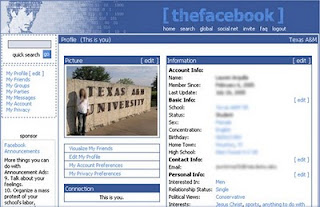 | |
| Facebook from its early days when it was known as thefacebook |
An exciting fact: In its earlier days, thefacebook.com required you to have an .edu email id to join.
Everywhere from its login page to Facebook groups, you find only blue.
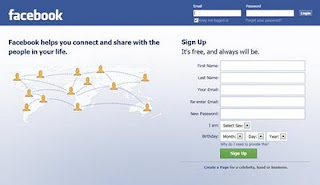 |
| Facebook Login Page. All Blue! |
The reason for this is that Mark Zuckerberg, the young founder of Facebook is red-green color-blind and blue is the richest colour for him which he confirmed in an online interview with Leo Laporte.
Another important commercial factor for using blue color is the fact that most colors tend to distract the viewers. Blue on the other hand acts as a transparent background to the main content as visible to the human brain due to which most popular websites tend to use the blue color. It can easily be called a webmaster's favorite color. Blue color is also sometimes referred to as 'Nirvana' for the brain.
All these factors make blue a prominent color on Facebook.
If you are bored with Facebook's blue theme and want a stylish theme, visit Change Facebook Theme.
3.Change Facebook Theme, Color & Appearance
Facebook is a social networking site which enables people to connect with friends and people around. That's how Facebook is usually introduced but Facebook is beyond the requirement of being introduced as almost everyone is on it. But Facebook has one flaw, the default blue theme is really boring.
Some even consider it an annoyance while visiting Facebook. As Facebook does not allow users to change its theme like MySpace used to, users are left with no other option but to bear the theme Facebook wants them to use.
However, it is relatively easy to change the Facebook theme to a stylish one using a Firefox addon and custom themes which are available free of cost on the internet.
An example of the final outcome would be something like in the image.
Requirement: The basic requirement for this to work is to have Mozilla Firefox 3.5 or higher.
Steps to achieve this: The following steps should be carried out to successfully change Facebook theme.


Now whenever you open Facebook, it will show the theme that you have installed with Stylish instead of the boring old blue theme.
Some even consider it an annoyance while visiting Facebook. As Facebook does not allow users to change its theme like MySpace used to, users are left with no other option but to bear the theme Facebook wants them to use.
However, it is relatively easy to change the Facebook theme to a stylish one using a Firefox addon and custom themes which are available free of cost on the internet.
An example of the final outcome would be something like in the image.
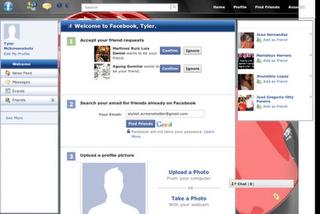 |
| This is the Ferrari theme. More themes are available for you to choose. |
Requirement: The basic requirement for this to work is to have Mozilla Firefox 3.5 or higher.
Steps to achieve this: The following steps should be carried out to successfully change Facebook theme.
- Open Mozilla Firefox and install 'Stylish' addon.
- Follow the basic steps to install the addon.
- Restart Firefox after successfully installing the Stylish addon.
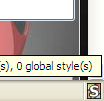
- Login to your Facebook Account and click on the small 'S' button in your Firefox status bar.
- Click on "Find Styles for this Site" to open a new tab with free themes to use for Facebook.
- Click on any theme and a preview will be shown.
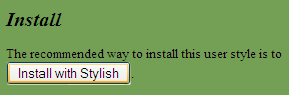
- If everything is fine in the previewed theme, click on "Install with Stylish" button at the top right corner of the page.
- A dialog box will open.
- Click on Install in the dialog box.
Now whenever you open Facebook, it will show the theme that you have installed with Stylish instead of the boring old blue theme.
4.How hackers hack Facebook Account & How to stop them?
Facebook is, undoubtedly, the most popular social networking website with more than 500 million active users. Due to its popularity, many hackers (or should I say crackers?) are actively involved in hacking Facebook accounts of unsuspecting users. This article outlines the many strategies that such hackers use to gain access to Facebook accounts of hundreds of users each day and how you can stop them from hacking your account.
How to safeguard your Email Address?
Just follow these steps:-
How to prevent yourself from being phished?
At all costs, avoid clicking on suspicious links. Moreover, always check the URL in the address bar before signing in. Avoid logging in through various "Facebook widgets" offered by websites and blogs. Instead, use Facebook's homepage to sign in. Always try to use Safe Search while searching. If you do manage to get phished, report the website so that others may get a warning before visiting it.

How to stop keyloggers?
Install a good antivirus and update it frequently. Do not click on suspicious links and avoid downloading illegal software. Also, avoid installing free toolbars and other such spam software. Always scan third-person's flash and pen drives before using them on your computer.
Detailed Guide:- PC Security tips to make computer secure
How to prevent yourself from being socially engineered?
Stay aware during chats and discussions. Use a tough security question, preferably one whose answer you would never disclose to anyone. Moreover, Facebook, or any other company for that matter, will never ask you to change your password to 12345678 or do something as silly as asking you to send out your login details to prove that you are an active user. Always think before taking actions and your e-life on Facebook will be safe from hackers looking to hack Facebook accounts.
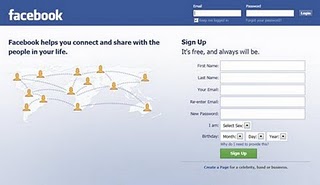 |
| Facebook is one of the prime target of hackers! |
Email Address Hack
I have always been puzzled by Facebook's leniency in this matter. All a hacker needs to do is know your email address and he will be displayed a confirmation showing your name even if he enters the wrong password. How easily a hacker can then hack your Facebook account if he 'guesses' your password (if you use a weak password) or answers your security question! This is something I hope Facebook improves on quickly. Until Facebook does so, here are some tricks you can use to protect yourself from this vulnerability.How to safeguard your Email Address?
Just follow these steps:-
- Hide your Email Address from everyone by going to Edit Profile>Contact Information>Clicking on the icon beside your email address> checking 'Only Me'.
- Change your primary email address to a one that is only known to you by going to Account Settings>Email> and changing your primary email to the new one (known only to you) and removing your previous email address.
- For additional security, when in Account Settings, check 'Secure browsing' and 'Send me an email when a new computer or mobile device logs into this account' and click Save.
 |
| A hacker at work! |
Phishing
Phishing is one of the easiest ways to trick users into giving out their login credentials. All a hacker does is setup a webpage similar in design to that of the Facebook homepage, attach a server sided script to track the username and password entered and store it in a log. Sending people emails stating that someone tagged a photo of them on Facebook in the same format as Facebook and giving a link below to the phishing website further reduces the chances of it being detected as a fake. Sometimes, spam Facebook apps, like those promising to tell who viewed your Facebook profile, automatically post links to phishing websites. A new trend amongst phishers is creating Facebook look-a-like widgets for stealing user's login credentials.How to prevent yourself from being phished?
At all costs, avoid clicking on suspicious links. Moreover, always check the URL in the address bar before signing in. Avoid logging in through various "Facebook widgets" offered by websites and blogs. Instead, use Facebook's homepage to sign in. Always try to use Safe Search while searching. If you do manage to get phished, report the website so that others may get a warning before visiting it.
Keylogging through Keyloggers
Keylogger is a type of computer virus that tracks key strokes. Keyloggers can be installed remotely on a computer system by a cracker to record all the activity that is going on the victim's computer. Keylogging gets more easy if the hacker has physical access to the victim's computer.How to stop keyloggers?
Install a good antivirus and update it frequently. Do not click on suspicious links and avoid downloading illegal software. Also, avoid installing free toolbars and other such spam software. Always scan third-person's flash and pen drives before using them on your computer.
Detailed Guide:- PC Security tips to make computer secure
Social Engineering
Social engineering involves using any trick to fool the user into making himself vulnerable to exploits. This could involve anything from sending spoof emails, pretending to be from Facebook, telling you to change your password to 12345678 to a hacker maliciously getting out the answer to your Security Question in a friendly chat or discussion.How to prevent yourself from being socially engineered?
Stay aware during chats and discussions. Use a tough security question, preferably one whose answer you would never disclose to anyone. Moreover, Facebook, or any other company for that matter, will never ask you to change your password to 12345678 or do something as silly as asking you to send out your login details to prove that you are an active user. Always think before taking actions and your e-life on Facebook will be safe from hackers looking to hack Facebook accounts.
5.Cool Facebook Status, Chat Tricks and Tips
Most of us use Facebook to interact with some of our long separated friends but that does not mean we cannot have fun on Facebook. Here is a collection of tricks, tips and Easter eggs you can use to enjoy your experience on Facebook.
Similarly, you can also turn Facebook upside down by selecting English(Upside Down) from the Languages dropdown. This will flip the entire Facebook interface but your status updates would still be "normal".
e.g. Mirror Effect:- !rorrim a ni deppart ma I !oN hO
e.g. Upside Down Effect:- ɯɐp ʞǝʎqoɐɹp¡
e.g Both Mirror and Upside Down Effect:- ¡poפ ǝɯ dlǝH ˙ʎzɐɹɔ ƃuıʇʇǝƃ sı uıɐɹq ʎW
e.g. Text in Bubbles:- Ⓞⓗ Ⓝⓞ! Ⓜⓞⓡⓔ ⓑⓤⓑⓑⓛⓔⓢ
Facebook Easter Eggs: Pirate Language ,Turn Facebook Upside Down
Facebook is not as famous for its Easter eggs as Microsoft, but that does not mean that Facebook's Easter eggs are not entertaining. The one which I especially find interesting is the Pirate Language trick. To enable Pirate Language in Facebook, login to Facebook, click on the down arrow at the right of the top navigation bar, click on Account Settings, click on Edit at the right of the Language option, and in the Primary Language dropdown menu, select English(Pirate) located somewhere near the bottom and be the captain of your Pirate Ship.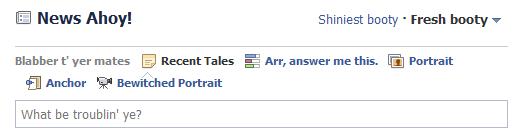 |
| Blabber t' yer mates |
Similarly, you can also turn Facebook upside down by selecting English(Upside Down) from the Languages dropdown. This will flip the entire Facebook interface but your status updates would still be "normal".
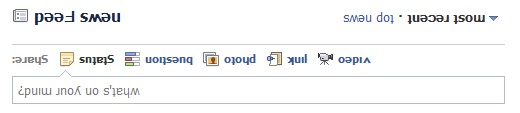 |
| See. Mark Zuckerberg does know how to headstand. |
Chat on Facebook in your Firefox sidebar while browsing other Websites
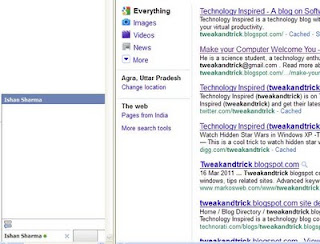
To do this, you need to bookmark http://facebook.com/login.php. Then click on Show all Bookmarks (Manage Bookmarks in older versions) in the Bookmarks menu, then locate the newly created bookmark, single click on it, then click on more in the footer, then check Load this bookmark in Sidebar. Now, you can open that bookmark in Firefox's sidebar and keep on browsing other websites too.Show Facebook Status Updates only to Specific People or Hide them from someone
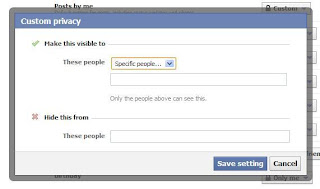
Facebook gives you the option to show your status updates to everyone or only your friends. You can further optimize Facebook so that your status updates are shown only to people you wish. Go to Privacy Settings by clicking the down arrow at the right of the top navigation bar and clicking Privacy Settings. Then, in the Control Your Default Privacy section, click on Custom. Then, customize who you wish to show your posts under the "Make this Visible to Specific People" option and adding their names. You can also hide your statuses from specific people by adding their name in the Hide from These section. You can also individually change the audience of your posts. Go to the post whose audience you wish to change and choose a different audience by clicking on the globe icon (which denotes that the post is public).Hide your past posts so that only your friends can see them
Now you can also customize your past posts so that only your friends can see your past activity. To do this, open Facebook Privacy Settings and under the "Limit the Audience for Past Posts" option, select "Limit Old Posts."Tag people in Status Updates, Wall Posts, Comments or Text
To tag someone in text in a manner that a link is created to the person's profile, use the @ symbol. eg. If you wish to tag John Jamison in your comment write @ John Jamison without any spelling mistake. If the person is in your friend list, a link in blue will be automatically created to the person's profile and he would be "tagged". |
| Facebook text tagging in action |
Write Upside Down, In Bubbles or Inverted Mirror-like text on Facebook
You might have seen many people update their Facebook status saying that "this was the last time they bought a keyboard on eBay" or "they have finally learnt how to update Facebook statuses while doing a headstand" written upside down. Here is how you too can flip text like that and add much more cool effects. Just go to Upside Down Text, uncheck Backwards effect, enter your text and copy the inverted one from the inverted text column and paste it in your status update or chats. You can also write inverted mirror like text by un-checking the upside down effect. To write in bubbles, click on the Bubble Ball text in the top Navigation bar.
e.g. Mirror Effect:- !rorrim a ni deppart ma I !oN hO
e.g. Upside Down Effect:- ɯɐp ʞǝʎqoɐɹp¡
e.g Both Mirror and Upside Down Effect:- ¡poפ ǝɯ dlǝH ˙ʎzɐɹɔ ƃuıʇʇǝƃ sı uıɐɹq ʎW
e.g. Text in Bubbles:- Ⓞⓗ Ⓝⓞ! Ⓜⓞⓡⓔ ⓑⓤⓑⓑⓛⓔⓢ
****Google Tricks****
1.Google Tricks, Easter Eggs & Secrets (Updated)
Google's engineers love to hide some pretty cool tricks at the most unexpected places. Add to that Google's policy of giving 20% of working time to its engineers to do what they want, and you have a search engine filled with lots of entertaining Easter eggs and tricks.
Sadly, most of these tricks are still a secret, but every now and then, Google employees leak these cool insider pranks and the whole world gets to know about them. Here, I have created a list of all such known Google tricks and Easter eggs that are still "working."

Kerning
Kerning means adjusting the spacing between characters. So, how would you expect Google to describe it? Literally, off course. When you search Google for Kerning, the spacing of the word Kerning is changed as compared to that of other words. This only works with personalized results disabled.
Conway's Game Of Life
Conway's Game Of Life is a game that indicates how cellular life evolves based on the initial configuration. If you search Google for Conway's Game of Life, you will get a results page with the game running in the background.
Jason Isaccs
Just search for Jason Isaacs and Google will return a page saying Hello to him. This is a reference to Kermode and Mayo's Film reviews which greets Jason with hello every week.
Bacon Number {Actor Name}
Kevin Bacon is a famous hollywood actor who was quoted as saying that he has worked with everybody in hollywood or somebody who has worked with them in 1994. This led to many websites being launched about his claim in 2007. Bacon seeing this immense response launched a charitable website called Six Degrees, which is based on a theory that everyone in hollywood has worked with Kevin Bacon through a chain of six acquaintances or less. An actor gets as many degrees as he is distant from Kevin Bacon's movies in terms of people in the chain of acquaintances.
Google too has now involved Six Degrees of Bacon in its search results. For example, searching Google for Bacon Number Johnny Depp gives Depp's Bacon number to be 2.
Google knows how to celebrate the holidays
Searching Google for a holiday will make Google return a page decorated with items representing that holiday. For example, searching Google for Christmas returns a page decorated with Christmas lights. This also works for Kwanzaa, Hanukkah, Halloween and Festivus. These Easter Eggs based on a festival are only activated when that festival is near.
Zerg Rush
Search Google for Zerg Rush and you will see the O's of Google attacking the search results page. They will attacking every result one by one. There is a health bar which indicates how injured a search result is. You can also kill these O's by clicking on them. They also have health bars which indicates their health. You get points on the basis of how many O's you kill. The aim of this game is to beat as many O's as possible.

Askew or Tilt
Ever had the chance of searching Google for Askew or Tilt? If you have, then you already know what comes up. If you haven't, do it now and you will see the search results page literally tilt to give you a better idea of what these words mean. This will work only if you use latest browsers which support HTML5 and CSS3. So, Internet Explorer users, use Firefox, Google Chrome or Safari for a while to use this.
Do a barrel roll
 'Do a barrel roll' in its true sense means to do a 360 degree spin. Google takes practical demonstrations way too seriously for this one and literally spins the search results page to give you a clearer idea of the meaning of this phrase. Don't believe me? Go search Google for Do a barrel roll now and see your world turn around.
This Easter egg is apparently a tribute to Star Fox, a video game series developed by Nintendo, because searching Google for Z or R Twice also does the barrel roll, just like in Star Fox. Many bloggers interpreted a lot of different things from this, but Google clarified that this fun trick was created by a Google Engineer solely for the purpose of entertaining users along with showing the power of new HTML5 and CSS3 technologies. Like the previous Easter egg, this will only work in modern browsers.
Binary, Octal and Hexadecimal Number systems
Another one of those literal Google Easter eggs. If you search Google for "Binary", "Octal" or "Hexadecimal" (without quotes) with Search Plus Your World disabled, Google will show the number of results in the same number system. For example, searching Google for hexadecimal will return the number of results like in the image below.

Recursion
The "Did you mean?" feature of Google often helps many users to get to the right results when they type something different from what they intended to search. If you search Google for recursion, the same feature takes you to an endless loop of clicks all linking to the same results page thereby completing recursion, which occurs when something calls itself. Seriously geeky.

Anagram
Another one of those "Did you mean?" Easter eggs. Search Google for Anagram and Google will instantly ask whether you meant "Nag A Ram" which is one of the anagrams of the word "anagram." Google really shows their word-playing skills with this one.
Asking Google to define Anagram makes Google ask if you meant nerd fame again.
ASCII Art
Are you a fan of ASCII art? Google surely is. Search Google for ASCII art and Google will greet you with a search results page having an ASCII version of the Google logo at the place where normal logo should have been. This Easter egg does not work anymore. When it did work, it looked like the image given below.

Google Reader Ninja
 Go to Google Reader, press Up, Up, Down, Down, Left, Right, Left, Right, B, A and the word Ninja! will magically appear in your search bar. Even the theme of the sidebar will be changed. Even though, the theme does not appear properly in the new version of Google Reader, it still is a cool trick.
Google Calculator Easter Eggs: The loneliest number
Do you know which is the loneliest number? Ask Google Calculator. Search Google for the loneliest number and the in-search Google Calculator will give one as the answer, which apparently is a tribute to the Harry Nilsson's song "One."
Once in a Blue Moon
 Ever wondered how much is 'once in a blue moon'? You must have heard this phrase often but Google calculator will give you the exact value of this phrase and surprisingly, it denotes frequency rather than time. Go search Google for this to get "1.16699016 × 10⁻⁸ hertz" as the answer.
Number of Horns on a Unicorn
Want to know the number of horns on a unicorn? Google calculator can help. Searching Google for the number of horns on a unicorn will give 1 as the answer.
Answer to the Ultimate Question of Life, the universe and everything
 Google is omniscient. Even the "answer to the ultimate question of life, the universe and everything" is known to Google. Just search Google for the above phrase and Google calculator will give you an answer. What are you waiting for? Just go to Google and find the true meaning of life.
[Pause to give you the time to search]
Surprised by the answer (42)? This is a reference to The Hitchhiker's Guide to the Galaxy, a popular novel based on a radio show (by the same name) of the late seventies. Google engineers surprised you with these tricks, didn't they?
Sadly, most of these tricks are still a secret, but every now and then, Google employees leak these cool insider pranks and the whole world gets to know about them. Here, I have created a list of all such known Google tricks and Easter eggs that are still "working."
Kerning
Kerning means adjusting the spacing between characters. So, how would you expect Google to describe it? Literally, off course. When you search Google for Kerning, the spacing of the word Kerning is changed as compared to that of other words. This only works with personalized results disabled.
Conway's Game Of Life
Conway's Game Of Life is a game that indicates how cellular life evolves based on the initial configuration. If you search Google for Conway's Game of Life, you will get a results page with the game running in the background.
Jason Isaccs
Just search for Jason Isaacs and Google will return a page saying Hello to him. This is a reference to Kermode and Mayo's Film reviews which greets Jason with hello every week.
Bacon Number {Actor Name}
Kevin Bacon is a famous hollywood actor who was quoted as saying that he has worked with everybody in hollywood or somebody who has worked with them in 1994. This led to many websites being launched about his claim in 2007. Bacon seeing this immense response launched a charitable website called Six Degrees, which is based on a theory that everyone in hollywood has worked with Kevin Bacon through a chain of six acquaintances or less. An actor gets as many degrees as he is distant from Kevin Bacon's movies in terms of people in the chain of acquaintances.
Google too has now involved Six Degrees of Bacon in its search results. For example, searching Google for Bacon Number Johnny Depp gives Depp's Bacon number to be 2.
Google knows how to celebrate the holidays
Searching Google for a holiday will make Google return a page decorated with items representing that holiday. For example, searching Google for Christmas returns a page decorated with Christmas lights. This also works for Kwanzaa, Hanukkah, Halloween and Festivus. These Easter Eggs based on a festival are only activated when that festival is near.
Zerg Rush
Search Google for Zerg Rush and you will see the O's of Google attacking the search results page. They will attacking every result one by one. There is a health bar which indicates how injured a search result is. You can also kill these O's by clicking on them. They also have health bars which indicates their health. You get points on the basis of how many O's you kill. The aim of this game is to beat as many O's as possible.
Askew or Tilt
Ever had the chance of searching Google for Askew or Tilt? If you have, then you already know what comes up. If you haven't, do it now and you will see the search results page literally tilt to give you a better idea of what these words mean. This will work only if you use latest browsers which support HTML5 and CSS3. So, Internet Explorer users, use Firefox, Google Chrome or Safari for a while to use this.
Do a barrel roll
This Easter egg is apparently a tribute to Star Fox, a video game series developed by Nintendo, because searching Google for Z or R Twice also does the barrel roll, just like in Star Fox. Many bloggers interpreted a lot of different things from this, but Google clarified that this fun trick was created by a Google Engineer solely for the purpose of entertaining users along with showing the power of new HTML5 and CSS3 technologies. Like the previous Easter egg, this will only work in modern browsers.
Binary, Octal and Hexadecimal Number systems
Another one of those literal Google Easter eggs. If you search Google for "Binary", "Octal" or "Hexadecimal" (without quotes) with Search Plus Your World disabled, Google will show the number of results in the same number system. For example, searching Google for hexadecimal will return the number of results like in the image below.
Recursion
The "Did you mean?" feature of Google often helps many users to get to the right results when they type something different from what they intended to search. If you search Google for recursion, the same feature takes you to an endless loop of clicks all linking to the same results page thereby completing recursion, which occurs when something calls itself. Seriously geeky.
Anagram
Another one of those "Did you mean?" Easter eggs. Search Google for Anagram and Google will instantly ask whether you meant "Nag A Ram" which is one of the anagrams of the word "anagram." Google really shows their word-playing skills with this one.
Asking Google to define Anagram makes Google ask if you meant nerd fame again.
ASCII Art
Are you a fan of ASCII art? Google surely is. Search Google for ASCII art and Google will greet you with a search results page having an ASCII version of the Google logo at the place where normal logo should have been. This Easter egg does not work anymore. When it did work, it looked like the image given below.
Google Reader Ninja
Google Calculator Easter Eggs: The loneliest number
Do you know which is the loneliest number? Ask Google Calculator. Search Google for the loneliest number and the in-search Google Calculator will give one as the answer, which apparently is a tribute to the Harry Nilsson's song "One."
Once in a Blue Moon
Number of Horns on a Unicorn
Want to know the number of horns on a unicorn? Google calculator can help. Searching Google for the number of horns on a unicorn will give 1 as the answer.
Answer to the Ultimate Question of Life, the universe and everything
[Pause to give you the time to search]
Surprised by the answer (42)? This is a reference to The Hitchhiker's Guide to the Galaxy, a popular novel based on a radio show (by the same name) of the late seventies. Google engineers surprised you with these tricks, didn't they?
2.Google - I'm Feeling Lucky Tricks & Jokes
Google is the search engine of choice for most users. This is well represented by the fact that Google averages one billion unique visitors every month. A reason for this popularity is Google's characteristic to integrate simplicity with usability.
Another major reason for this popularity is Google's minimalistic homepage, which consists of a search bar and two buttons, Search and I'm Feeling Lucky. We all know what the search button does, it takes us to a search results page consisting of top ten results that match our query. The "I'm Feeling Lucky" button on the other hand takes you to the top ranking page in the search results for a particular query.

Some webpages use this behavior to create some amazing and funny results. Here is a list of few such keywords that have some funny websites at the first position in Google. To use these tricks, open Google's homepage, type in the phrase and hit the I'm feeling lucky button. To use the I'm feeling lucky button, you have to disable Google Instant.
Google Gravity
 The force of gravity is non-existent in cyber space. Google gravity makes you realize how Google would have been if gravity had been effective on the internet as well. Just type Google gravity in the search bar and press the I'm feeling lucky button. This will take you to the Google gravity page which, at first look, might appear to be the Google homepage itself. Wait for a few seconds and you will realize why this Chrome experiment is called Google gravity. Although the website lists it as a Chrome experiment, it works on Mozilla Firefox as well, although it does not work on IE8 and previous versions of IE.
Google Sphere
Want to see images on Google dance in circular motion? Google sphere is the phrase for that. This phrase will take you to the Google sphereChrome experiment. Google sphere is a modified version of Image search that adds a bit of fun to your regular search. This Chrome experiment, just like the previous one, works on Chrome, Firefox and IE9.
Epic Google
Epic Google will take you to a growing version of Google that will continue to increase in size until it becomes too large to read.
 Enable Pirate language in Google
Remember the Facebook Pirate language trick? Google too has their own pirate version to compete with that of Facebook's. Just use the Google Pirate phrase or directly head over to Google Pirate.
Google Rainbow
This phrase will take you to a Google search homepage in which each element changes its color rapidly to create the rainbow effect. The search result page obtained for queries is very annoying too as it contains a very loud color combination of red, blue and green.
Annoying Google
Want to get annoyed while searching on Google? This one is for you. This phrase will take you to a Google search homepage with each word having alternate capital and small letters making everything a bit too hard to read.
2204355
Are you already familiar with the age old internet prank called rick-rolling and want to discover something new? Chicken rolling is for you. Try this new way of trapping unsuspecting internet users by typing the code 2204355 in the Google search box and hitting the "Lucky button."
LOL Limewire
Type in LOL Limewire in Google and you will be taken to a .swf file claiming that you are a pirate and telling you to "do what you want cause a pirate is free." Funny!
 Find Chuck Norris
This one is for all fans of Chuck Norris jokes. We all know that you don't find Chuck Norris, he finds you. The find Chuck Norris phrase proves the fact further.
Who is the cutest?
Want to know who is the cutest person in the world? Just use this phrase. This one will definitely make you smile.
Most of these websites are not owned by Google. They were created independently to achieve these effects.
Another major reason for this popularity is Google's minimalistic homepage, which consists of a search bar and two buttons, Search and I'm Feeling Lucky. We all know what the search button does, it takes us to a search results page consisting of top ten results that match our query. The "I'm Feeling Lucky" button on the other hand takes you to the top ranking page in the search results for a particular query.
Some webpages use this behavior to create some amazing and funny results. Here is a list of few such keywords that have some funny websites at the first position in Google. To use these tricks, open Google's homepage, type in the phrase and hit the I'm feeling lucky button. To use the I'm feeling lucky button, you have to disable Google Instant.
Google Gravity
Google Sphere
Want to see images on Google dance in circular motion? Google sphere is the phrase for that. This phrase will take you to the Google sphereChrome experiment. Google sphere is a modified version of Image search that adds a bit of fun to your regular search. This Chrome experiment, just like the previous one, works on Chrome, Firefox and IE9.
Epic Google
Epic Google will take you to a growing version of Google that will continue to increase in size until it becomes too large to read.
Remember the Facebook Pirate language trick? Google too has their own pirate version to compete with that of Facebook's. Just use the Google Pirate phrase or directly head over to Google Pirate.
Google Rainbow
This phrase will take you to a Google search homepage in which each element changes its color rapidly to create the rainbow effect. The search result page obtained for queries is very annoying too as it contains a very loud color combination of red, blue and green.
Annoying Google
Want to get annoyed while searching on Google? This one is for you. This phrase will take you to a Google search homepage with each word having alternate capital and small letters making everything a bit too hard to read.
2204355
Are you already familiar with the age old internet prank called rick-rolling and want to discover something new? Chicken rolling is for you. Try this new way of trapping unsuspecting internet users by typing the code 2204355 in the Google search box and hitting the "Lucky button."
LOL Limewire
Type in LOL Limewire in Google and you will be taken to a .swf file claiming that you are a pirate and telling you to "do what you want cause a pirate is free." Funny!
This one is for all fans of Chuck Norris jokes. We all know that you don't find Chuck Norris, he finds you. The find Chuck Norris phrase proves the fact further.
Who is the cutest?
Want to know who is the cutest person in the world? Just use this phrase. This one will definitely make you smile.
Most of these websites are not owned by Google. They were created independently to achieve these effects.
3.I'm Feeling Lucky Easter Eggs on Google
Although Google feels the I'm feeling lucky button is not 'as useful', it can still be used to try some excellent 3rd party Easter eggs that are a direct result of Google bombing (remember miserable failure and the whole George Bush case?).
While I have already written about some of these, I missed some immensely popular ones. So, this is a roundup article of all those funny "first results" I did not include in the previous article. Before starting this list, I would advise you to disable Instant from your Google preferences. To get the most out of this article, go to Google's homepage, type in these phrases and hit the I'm Feeling Lucky button.
 Google Loco
Type Google Loco in the Search box, hit the I'm feeling lucky button and you will be taken to a Google homepage where each letter of the Google logo will continuously dance. Also, the search button and the I'm feeling lucky lucky button are written in the incomprehensible Wingdings font. What you type in the search box also appears in the same font. Even the search box changes its colour every time you type a letter.
Google Pacman
 Not a Google bomb but an immensely popular doodle which Google used on its homepage on the 30th anniversary of Pacman, the arcade game in May 2010. Just type Google Pacman in the search box, hit the I'm feeling lucky button and you will be taken to the Google Pacman page. You can use your arrow keys to start playing the game. To play in 2 player mode, hit the Insert Coin button. W, S, A and D keys will control the second player.
Google Guitar (Les Paul Doodle)
Another very popular doodle which Google featured on its homepage to mark the 96th birthday of Les Paul. This flash and JavaScript based doodle allows users to not only play tunes by holding down the guitar and twanging its strings but also to record them. It also gives a link to share the recorded tunes with your friends. Just use the Google Guitar phrase or directly head over to Google Guitar.
Google Hacker
 Ever wondered what Google would look like if it was hacked? Google Hacker can give you an idea of such a scenario. Just use the Google Hacker phrase and you will be taken to a Google homepage entirely in the leet language ( the language supposed to be used by hackers), where Normal Search is n0rM4L s34rCh, and the I'm feeling lucky button is "Eye Am ph33|1n6 |u(ky." This is an official Easter egg by one of those crazy Google engineers.
Google Weenie
Do you get angry at websites with extremely small fonts? Google weenie will definitely make you angry then. Type this phrase in the Google Search box and you will be taken to a Google homepage where everything decreases in size until it becomes a bit too small to read. This website is the exact opposite of Epic Google where everything grows in size.
Google Magic
 Do you like magic? Here's a trick to impress your friends with. Type in Google Magic in the Google search box and hit the I'm feeling lucky button and you will be taken to a special Google homepage. On this page, cover the two O's in the Google Logo with your hand and click anywhere on the page. Wait for sometime (5 seconds). You can say some magic words to add effect. Remove your hand and you will be surprised to see that the two O's have disappeared. Again cover the two O's and click anywhere on the page. Again wait for 5 seconds and the O's will magically reappear. A third click however will take you to the actual Google homepage.
Search Google in different colors
Are you bored of Google's default color scheme and want to try something different? Then search Google in different colors. Just use the word Google followed by your color and hit the I'm feeling lucky button and you will be taken to a Google homepage in that paricluar color. (e.g: Google Pink, Google blue etc.)
Some more I'm feeling lucky fun
In order to allow you to fully enjoy the surprise, the following keywords haven't been provided a detailed description. Just type them in the search bar and hit the I'm feeling lucky button, or alternatively click on the first search result.
While I have already written about some of these, I missed some immensely popular ones. So, this is a roundup article of all those funny "first results" I did not include in the previous article. Before starting this list, I would advise you to disable Instant from your Google preferences. To get the most out of this article, go to Google's homepage, type in these phrases and hit the I'm Feeling Lucky button.
Type Google Loco in the Search box, hit the I'm feeling lucky button and you will be taken to a Google homepage where each letter of the Google logo will continuously dance. Also, the search button and the I'm feeling lucky lucky button are written in the incomprehensible Wingdings font. What you type in the search box also appears in the same font. Even the search box changes its colour every time you type a letter.
Google Pacman
Google Guitar (Les Paul Doodle)
Another very popular doodle which Google featured on its homepage to mark the 96th birthday of Les Paul. This flash and JavaScript based doodle allows users to not only play tunes by holding down the guitar and twanging its strings but also to record them. It also gives a link to share the recorded tunes with your friends. Just use the Google Guitar phrase or directly head over to Google Guitar.
Google Hacker
Google Weenie
Do you get angry at websites with extremely small fonts? Google weenie will definitely make you angry then. Type this phrase in the Google Search box and you will be taken to a Google homepage where everything decreases in size until it becomes a bit too small to read. This website is the exact opposite of Epic Google where everything grows in size.
Google Magic
Search Google in different colors
Are you bored of Google's default color scheme and want to try something different? Then search Google in different colors. Just use the word Google followed by your color and hit the I'm feeling lucky button and you will be taken to a Google homepage in that paricluar color. (e.g: Google Pink, Google blue etc.)
Some more I'm feeling lucky fun
In order to allow you to fully enjoy the surprise, the following keywords haven't been provided a detailed description. Just type them in the search bar and hit the I'm feeling lucky button, or alternatively click on the first search result.
| Google Flight Simulator | Google Gothic | Goglogo | Google Reverse |
| Google Piglatin | Google God | Ewmew Fudd | Google Bork |
| Pigeon Rank | Google Klingon | Google Church | The Google Book |
| Mental Plex | Google Gulp | Google TiSP | CADIE |
| gDay with MATE | Translate for Animals | Google Pond | G.C.H.E.E.S.E. |
| Funny Google | "Googlo" | Google Blackle | Google Variations |
****Blogging****
1.What is a Blog?
I recently started blogging at this blog. When I informed some of my
friends that I have started a blog, the first thing they did was to ask a
question. Neither about the topic of my blog nor about its address. The
first question they asked was 'What is a Blog'?
Upon hearing this, I was for some time left astonished; whether on the simplicity of the question or my inability to convey to them what a blog was, that I cannot tell. After trying for hours to make it clear to them what a blog was, I came up with the idea of writing this post. So here I am writing a post describing what is a blog.
The idea of a Web Log (or just blog) in its simplest description is to provide an electronic alternative to a personal diary. But, unlike personal diaries, blogs are intended to be public. Public in the sense that they can be viewed by anyone. However, this is not always the case. Your blog is totally your domain and it is up to you whether you want it to be public or only limit it to the users you choose.
Diary Blogs are not the only type of blogs. A blog can be focused on only one topic like HTML in which case it is called a niche blog or be totally random in which case it is referred to as a personal blog or even a random blog. As earlier said, there is no limit upon the topic of your blog.

Then there are Photo blogs and Video blogs too which contain content only in the form photos and videos respectively. Blogs are not limited to individuals only. They are also used by companies to inform latest developments within the companies and also as a method to improve their public relations. Other common types of blogs are Art blogs and Music blogs.
Because of the ease of setting up a blog and its ability to transcend borders, blogging has evolved drastically in the past decade. Blogs have become a great way of socializing too. Blogs serve as a platform to showcase a person's thought to the online world.
Blogs are commonly updated regularly. This might probably be the only difference between a blog and a website. Websites tend to be static in nature and blogs on the other hand are dynamic in nature. A website can comprise of only a blog or have a blog as its part.
Regular Updates are not just limited to blogging; due to the preference search engines give to regularly updated content, most websites are updated regularly and the difference between blogs and websites is narrowing. It is becoming tougher and tougher to differentiate between the two.
However, the availability of a commenting system presently serves as the biggest differentiation between a blog and a website.
Now after this post, may be you might now more clearly understand what a blog is.
Upon hearing this, I was for some time left astonished; whether on the simplicity of the question or my inability to convey to them what a blog was, that I cannot tell. After trying for hours to make it clear to them what a blog was, I came up with the idea of writing this post. So here I am writing a post describing what is a blog.
The idea of a Web Log (or just blog) in its simplest description is to provide an electronic alternative to a personal diary. But, unlike personal diaries, blogs are intended to be public. Public in the sense that they can be viewed by anyone. However, this is not always the case. Your blog is totally your domain and it is up to you whether you want it to be public or only limit it to the users you choose.
Diary Blogs are not the only type of blogs. A blog can be focused on only one topic like HTML in which case it is called a niche blog or be totally random in which case it is referred to as a personal blog or even a random blog. As earlier said, there is no limit upon the topic of your blog.
Then there are Photo blogs and Video blogs too which contain content only in the form photos and videos respectively. Blogs are not limited to individuals only. They are also used by companies to inform latest developments within the companies and also as a method to improve their public relations. Other common types of blogs are Art blogs and Music blogs.
Because of the ease of setting up a blog and its ability to transcend borders, blogging has evolved drastically in the past decade. Blogs have become a great way of socializing too. Blogs serve as a platform to showcase a person's thought to the online world.
Blogs are commonly updated regularly. This might probably be the only difference between a blog and a website. Websites tend to be static in nature and blogs on the other hand are dynamic in nature. A website can comprise of only a blog or have a blog as its part.
Regular Updates are not just limited to blogging; due to the preference search engines give to regularly updated content, most websites are updated regularly and the difference between blogs and websites is narrowing. It is becoming tougher and tougher to differentiate between the two.
However, the availability of a commenting system presently serves as the biggest differentiation between a blog and a website.
Now after this post, may be you might now more clearly understand what a blog is.
2.How to Move a Blogger Blog to Your Own Domain: Tips and Tricks
What a week this has been for this tech blog!
I finally moved it from blogspot subdomain to a custom domain. I have
been wanting to do this since a long time (ever since this blog started
getting some attention) , I somehow couldn't manage to do so because of
the fear of losing search traffic.
Google's recent move to redirect blogspot.com to country specific sub domains helped me solidify my decision to the extent of finally moving. I made a lot of other changes as well and have listed as much of them as possible as they might help some of you who are also planning to make the move. I have listed them in the order in which I made them.
1) Registered rannuraj.com
2) Changed my domain's settings to hide personal information from being displayed in the who is database.
3) Modified my domain's CNAME and A records to correctly point to Google's servers. Check this page from Blogger for details regarding this step.
4) Generally, it takes some time for your domain registrar to completely update the settings mentioned above. So, if you immediately point your new domain to your blog, users will see a 404 error. To avoid this, I created a new blogspot blog and modified its settings to point to my new domain.
5) When my domain correctly started loading the temporary blog, I modified this blog's settings to link it to the new domain. Now my new domain was correctly loading my blog. While doing this, I made sure to select redirecting the non www version to the www one.

6) Downloaded my blog's template and opened the downloaded XML file in Wordpad. I then used Wordpad's Find and Replace function to replace each occurrence of tweakandtrick.blogspot.com with www.tweakandtrick.com and uploaded the modified template. This automatically changed all navigational links to use the new domain.
7) Some widgets still had links pointing to the blogspot subdomain. I changed them manually.
8) Went to Google Webmaster Tools, added my new domain and submitted the full sitemap. Normal Blogger feeds show only 20 URL's, so in order to submit all the URL's, I submitted a custom queried feed that includes 500 URL's.
Normal Feed: /atom.xml
Feed I Submitted: /atom.xml?redirect=false&orderby=updated&max-results=500
9) Bing also brings considerable amount of traffic to this blog. So, I added the new domain to Bing Webmaster Tools and submitted the same sitemap.
10) Blogspot uses 301 permanent redirects to redirect visitors to new domains. This should have normally allowed Google to immediately index my new blog's URLs but it did not. So, I resubmitted my old blog's complete sitemap in Google Webmaster Tools. As the Blogspot blog had some authority in Google, GWT quickly processed the sitemap and immediately noticed that all those posts had moved to the new domain. This notified Google to index my content under the new domain and after almost 12 hours, my old blogspot URL's started getting replaced by the new ones.

11) Notified readers of the move on Facebook and Twitter.
12) After making the move, my search traffic is way lower than normal. This should change and traffic should return to normal once search engines completely transfer my Blogspot subdomain's trust and authority to this new one.
Some other changes I made
1) Used Feedburner's MyBrand feature to transfer my FeedBurner feed to my own sub-domain.
2) Modified my social profiles to link to my new domain.
3) Earlier, my about page and categories on this blog were simple posts that included dates in the URL. This made them look ugly, so I shifted these to independent Pages and canonicalized the old pages to new ones.
Some Noticeable Benefits
It is too early to say this but ever since I moved to my own domain, the subscription rate has gone up considerably. It has also increased the percentage of users who are completing the subscription process.
Google's recent move to redirect blogspot.com to country specific sub domains helped me solidify my decision to the extent of finally moving. I made a lot of other changes as well and have listed as much of them as possible as they might help some of you who are also planning to make the move. I have listed them in the order in which I made them.
Rannuraj.blogspot.com---------->rannuraj.com
1) Registered rannuraj.com
2) Changed my domain's settings to hide personal information from being displayed in the who is database.
3) Modified my domain's CNAME and A records to correctly point to Google's servers. Check this page from Blogger for details regarding this step.
4) Generally, it takes some time for your domain registrar to completely update the settings mentioned above. So, if you immediately point your new domain to your blog, users will see a 404 error. To avoid this, I created a new blogspot blog and modified its settings to point to my new domain.
5) When my domain correctly started loading the temporary blog, I modified this blog's settings to link it to the new domain. Now my new domain was correctly loading my blog. While doing this, I made sure to select redirecting the non www version to the www one.
6) Downloaded my blog's template and opened the downloaded XML file in Wordpad. I then used Wordpad's Find and Replace function to replace each occurrence of tweakandtrick.blogspot.com with www.tweakandtrick.com and uploaded the modified template. This automatically changed all navigational links to use the new domain.
7) Some widgets still had links pointing to the blogspot subdomain. I changed them manually.
8) Went to Google Webmaster Tools, added my new domain and submitted the full sitemap. Normal Blogger feeds show only 20 URL's, so in order to submit all the URL's, I submitted a custom queried feed that includes 500 URL's.
Normal Feed: /atom.xml
Feed I Submitted: /atom.xml?redirect=false&orderby=updated&max-results=500
9) Bing also brings considerable amount of traffic to this blog. So, I added the new domain to Bing Webmaster Tools and submitted the same sitemap.
10) Blogspot uses 301 permanent redirects to redirect visitors to new domains. This should have normally allowed Google to immediately index my new blog's URLs but it did not. So, I resubmitted my old blog's complete sitemap in Google Webmaster Tools. As the Blogspot blog had some authority in Google, GWT quickly processed the sitemap and immediately noticed that all those posts had moved to the new domain. This notified Google to index my content under the new domain and after almost 12 hours, my old blogspot URL's started getting replaced by the new ones.
11) Notified readers of the move on Facebook and Twitter.
12) After making the move, my search traffic is way lower than normal. This should change and traffic should return to normal once search engines completely transfer my Blogspot subdomain's trust and authority to this new one.
Some other changes I made
1) Used Feedburner's MyBrand feature to transfer my FeedBurner feed to my own sub-domain.
2) Modified my social profiles to link to my new domain.
3) Earlier, my about page and categories on this blog were simple posts that included dates in the URL. This made them look ugly, so I shifted these to independent Pages and canonicalized the old pages to new ones.
Some Noticeable Benefits
It is too early to say this but ever since I moved to my own domain, the subscription rate has gone up considerably. It has also increased the percentage of users who are completing the subscription process.
3.Guest Blogging has Disadvantages that could Harm your Blog
I think that accepting guest posts on your blog is a great way to
connect with new webmasters and offer fresh perspective to your blog's
readers. Guest Blogging has many more advantages, but it has some risks
and disadvantages that cannot be overlooked. Here are some ways in which
guest blogging could actually harm your website:-
- Guest bloggers get a direct search engine friendly (read dofollow) backlink from your blog. As a dofollow link mean that you trust a website, Google and other search engines are likely to penalize your website if you link to spammy pages or pages created solely for the purpose of generating sales.
- Guest Posts can be unrelated to your blog's niche. This could not only frustrate your subscribers but also make Google think that your website is a content farm. This is certainly not what you wish Google to think about your website especially after the dreaded Google Farmer aka Panda Update.
- Extremely short guest posts could mean addition of low quality pages (read thin content) on your website. This would reduce the overall quality of your blog for both human readers and search engine bots.
- Guest Posts could annoy your regular readers. Regular visitors of your website visit because they like your opinions and wish to read more from you, not from some stranger who they hardly know or have any information about.
- Guest Blogging could actually lower the number of subscribers on your blog. This is basically a result of the previous two points. When your subscribers find that you provide irrelevant updates, they would undoubtedly wish to unsubscribe themselves from your blog.
- Some guest authors copy content from other websites. If you are not able to discover it and publish their submissions, you further risk annoying readers who might know the original source of those posts. This could also result in search engines lowering your rankings for high traffic keywords as a result of the duplicate content effect.
- Some guest authors take your blog up for granted and often submit posts that are written with lack of attention and an uncaring attitude. This results in receiving useless submissions which lead to wastage of your time reading and sorting through them.
- Some guest authors write self promoting content with the aim of driving traffic to their websites. Hence, they deliberately try to make their articles less informative so that a reader must visit them in order to get full details. This again annoys your readers and results in low quality pages.
 |
| Guest Blogging has some disadvantages |
What should you do with guest posts? Should you accept them or not?
My recommendation would be that you should allow guest posting on your blog but, always take a close look at the author's website and make sure that it is worth a link. Moreover, set some quality standards for accepting articles and try to be professional in your decisions. Do not accept posts that you yourself do not like, after all your readers trust your opinions and that is the main reason they are reading your blog anyway.4.Use Long tail Keywords to Increase Blog Traffic
Keyword research is
one of the fundamental parts of any search engine optimization
strategy. Before you start trying to get to the top of the search
rankings, you have to decide which search terms you want to rank well
for. Ideally they should be relevant to your topic, so searchers find
what they were looking for, popular enough to bring in a good stream of
traffic, but not so competitive that ranking well is impossible.
Most bloggers and webmasters who do keyword research aim to find opportunities where the search term is fairly popular, but not fiercely contested. The idea is that it's no use trying to rank well for 'san diego hotels' because some very big players target that keyword and it's going to be very hard to rank well for it, and it's no use putting all your time and effort into ranking well for 'cheap dog friendly san diego hotels' because capturing the top spot won't do you much good. Very few people will search for that phrase.

But what if you don't focus all your efforts on that very specific keyword? What if you do the minimum amount of work required to rank well for that phrase (if it's not very competitive it won't take much work), then do the same for 30 more like it? Each one may not bring in much traffic alone, but between them they could supply a healthy stream of visitors. The total amount of work required to rank well for 30 easy keywords could still be a lot less than what you'd have to put in to rank well for one very strong keyword.
That's the principle behind 'long tail' keywords. They aren't popular but they are easy to rank for, and if you get enough of them, they can bring in plenty of visitors.
It's not just a clever way of boosting the number of arrivals either. It's very clear what someone searching for 'cheap dog friendly san diego hotels' wants. If you can provide a page that contains that specific information, you'll have a good chance of making that visitor very happy. They'll be far more likely to click on an affiliate link, sign up to your newsletter, or even just spend a lot of time on your site than someone who arrived through a more general keyword and didn't find exactly what they were after.
Blogs are ideal for targeting long tail keywords. You have the freedom to write each post on a very specific topic and can add as many new, diverse pages as you like- something that can make sites with a more static architecture look cluttered and untidy.
You don't need to focus your whole strategy around long tail keywords, but just choosing half a dozen to experiment with can be a worthwhile activity. Pick a few relevant, low competition and relatively low traffic phrases and see what it takes to get your blog ranking well for them. Compare the amount of work required with the traffic you get back (remembering that long tail traffic can be very high quality) and you might find that these keywords deliver a pretty good return on a very small investment.
Most bloggers and webmasters who do keyword research aim to find opportunities where the search term is fairly popular, but not fiercely contested. The idea is that it's no use trying to rank well for 'san diego hotels' because some very big players target that keyword and it's going to be very hard to rank well for it, and it's no use putting all your time and effort into ranking well for 'cheap dog friendly san diego hotels' because capturing the top spot won't do you much good. Very few people will search for that phrase.
But what if you don't focus all your efforts on that very specific keyword? What if you do the minimum amount of work required to rank well for that phrase (if it's not very competitive it won't take much work), then do the same for 30 more like it? Each one may not bring in much traffic alone, but between them they could supply a healthy stream of visitors. The total amount of work required to rank well for 30 easy keywords could still be a lot less than what you'd have to put in to rank well for one very strong keyword.
That's the principle behind 'long tail' keywords. They aren't popular but they are easy to rank for, and if you get enough of them, they can bring in plenty of visitors.
It's not just a clever way of boosting the number of arrivals either. It's very clear what someone searching for 'cheap dog friendly san diego hotels' wants. If you can provide a page that contains that specific information, you'll have a good chance of making that visitor very happy. They'll be far more likely to click on an affiliate link, sign up to your newsletter, or even just spend a lot of time on your site than someone who arrived through a more general keyword and didn't find exactly what they were after.
Blogs are ideal for targeting long tail keywords. You have the freedom to write each post on a very specific topic and can add as many new, diverse pages as you like- something that can make sites with a more static architecture look cluttered and untidy.
You don't need to focus your whole strategy around long tail keywords, but just choosing half a dozen to experiment with can be a worthwhile activity. Pick a few relevant, low competition and relatively low traffic phrases and see what it takes to get your blog ranking well for them. Compare the amount of work required with the traffic you get back (remembering that long tail traffic can be very high quality) and you might find that these keywords deliver a pretty good return on a very small investment.
5.Health Tips for Bloggers: Stay Healthy While you Blog
Sitting most of the day is not good for your health. Experts say it is
better to stand rather than sit while you go about your daily work. This
usually means raising your computer monitor to eye-level, and elevating
the keyboard and mouse to a height that is easy to use from a standing
position. This has led to the growing trend of creating “standing office
workstations.” However, there are other things bloggers can do to
counteract the effects of sitting all day.
You are what you eat
Your diet is important. If you spend most of your time sitting down, you may be gaining fat. Schedule meals on your calendar, and treat them like any other appointment. This prevents binging on fast food. In addition, prepare your own food, so you will know what is in it. Drink loose-leaf tea, which is better for fat-loss than coffee. It is also good for increasing energy levels. Control the amount of snacks you eat during the day.
Avoid snacks with starches and sugars.
With the multitude of sites and apps concerning calorie counting, maintaining your weight and making sure you eat the right things couldn’t be easier. If you don’t want to stretch so far as to be counting calories on a regular basis, simply being careful and not opting for that regular unhealthy snack can make a big difference to a blogger’s wellbeing.
Back problems
 Prevent back problems with the following tips. Get a chair that lets you
put your feet on the floor while keeping your hips and knees level. Use
a footstool to accomplish this, if necessary. Every half hour get up
and go for a short walk. This is also a convenient time to drink some
water, so keep a bottle nearby. Drinking water will help you to be more
alert.
Prevent back problems with the following tips. Get a chair that lets you
put your feet on the floor while keeping your hips and knees level. Use
a footstool to accomplish this, if necessary. Every half hour get up
and go for a short walk. This is also a convenient time to drink some
water, so keep a bottle nearby. Drinking water will help you to be more
alert.
Exercise at your desk
Here are a few exercises you can do at your desk. To stretch the back, roll your shoulders backward in a circle a few times and then relax. Stretch your neck every so often by looking right and left. Tilt your head from side to side, then backward and forward. The more adventurous blogger should consider getting an exercise ball to use as a chair. This will help to keep your spine in proper alignment. You will find that it is easier to do stretching exercises when sitting on one of these. Also, it’s a good idea to stretch your hands and fingers in between all that blogging!
Go for a run
It’s a new fad that seems taking off in offices around the world. You can go for a job during your break or maybe even at the end of the day around the office block. It helps if there’s a shower at your work though!
Other health issues for bloggers
Lessen the possibility of getting headaches and eye irritation. Every 30 minutes or so, look away from your computer screen. Focus on other objects in the room. It could be anything, a clock or a desk, for instance.
Pay attention to your oral-health. Prevent gum disease by brushing and flossing your teeth carefully. Gum disease is four times more prevalent in smokers than in non-smokers. Tobacco use of any kind will increase the risk of gum-disease, so try not to skip out and have a cigarette.
Making a few basic changes as suggested above can go a long way toward keeping bloggers healthy. Things such as scheduling when you eat, drinking water, making sure your chair is ergonomic and doing various exercises at your desk can be easily included in your work routine. Get started today for a healthier tomorrow.
This is a guest post by Richard. Richard is a freelance writer who produces content related to health and technology. He mainly writes on issues related to cosmetic dentistry. Pay him a visit at @thefreshhealth.
You are what you eat
Your diet is important. If you spend most of your time sitting down, you may be gaining fat. Schedule meals on your calendar, and treat them like any other appointment. This prevents binging on fast food. In addition, prepare your own food, so you will know what is in it. Drink loose-leaf tea, which is better for fat-loss than coffee. It is also good for increasing energy levels. Control the amount of snacks you eat during the day.
Avoid snacks with starches and sugars.
With the multitude of sites and apps concerning calorie counting, maintaining your weight and making sure you eat the right things couldn’t be easier. If you don’t want to stretch so far as to be counting calories on a regular basis, simply being careful and not opting for that regular unhealthy snack can make a big difference to a blogger’s wellbeing.
Back problems
Exercise at your desk
Here are a few exercises you can do at your desk. To stretch the back, roll your shoulders backward in a circle a few times and then relax. Stretch your neck every so often by looking right and left. Tilt your head from side to side, then backward and forward. The more adventurous blogger should consider getting an exercise ball to use as a chair. This will help to keep your spine in proper alignment. You will find that it is easier to do stretching exercises when sitting on one of these. Also, it’s a good idea to stretch your hands and fingers in between all that blogging!
Go for a run
It’s a new fad that seems taking off in offices around the world. You can go for a job during your break or maybe even at the end of the day around the office block. It helps if there’s a shower at your work though!
Other health issues for bloggers
Lessen the possibility of getting headaches and eye irritation. Every 30 minutes or so, look away from your computer screen. Focus on other objects in the room. It could be anything, a clock or a desk, for instance.
Pay attention to your oral-health. Prevent gum disease by brushing and flossing your teeth carefully. Gum disease is four times more prevalent in smokers than in non-smokers. Tobacco use of any kind will increase the risk of gum-disease, so try not to skip out and have a cigarette.
Making a few basic changes as suggested above can go a long way toward keeping bloggers healthy. Things such as scheduling when you eat, drinking water, making sure your chair is ergonomic and doing various exercises at your desk can be easily included in your work routine. Get started today for a healthier tomorrow.
This is a guest post by Richard. Richard is a freelance writer who produces content related to health and technology. He mainly writes on issues related to cosmetic dentistry. Pay him a visit at @thefreshhealth.
6.Discover New Blog Post Ideas with Google Analytics Data
Anyone who has kept
a blog for some time or who writes for a living has likely experienced
that feeling of no inspiration. There’s absolutely nothing left in the
tank – even all the rubbish ideas have been used up and you are left
feeling unmotivated. It is at this point that sometimes blogs can get
abandoned, as constantly thinking up new ideas is hard work and tiring.
My first stop when I get to this stage is usually Google News. Just having a read through some of the top stories can trigger a hook to link one to the theme of your blog, and if you optimise properly, you could even get on top of some of the traffic for that particular story. It is easier said than done, however, and there aren’t always big stories around that are relevant.
 What
I prefer to do is rely on Google Analytics to work as my inspiration on
those uphill days. Chances are you will be getting some longtail
traffic in to your blog. If you aren’t, you may need to work on your
blog’s optimisation a bit before this technique is useful. By
scrutinising your longtail traffic
and understanding the terms people are actually using to reach your
blog you can get some innovative ideas as to areas to plan your next
blog posts around.
What
I prefer to do is rely on Google Analytics to work as my inspiration on
those uphill days. Chances are you will be getting some longtail
traffic in to your blog. If you aren’t, you may need to work on your
blog’s optimisation a bit before this technique is useful. By
scrutinising your longtail traffic
and understanding the terms people are actually using to reach your
blog you can get some innovative ideas as to areas to plan your next
blog posts around.
So to look at longtail traffic in Analytics you need to go into the Traffic Sources -> Keyword report (or Traffic sources -> sources -> search -> organic if you are using the hideous new version of Analytics). Go to page 10 of referring key terms and have a poke about to see what’s in there. Chances are there will be some quite interesting terms.
For example, a quick look at a random sample of my referring key term report reveals that there could be good mileage in blog posts about cartoon audio effects, music for schools, thunder sound effects and tire skid sound effects. These base ideas can be expanded into popular/entertaining/ interesting topics – best cartoon sound effects, most impressive tire skids in films, top 5 thunderstorm scenes in films, teaching with music in school. Sometimes you hit the jackpot and come across an idea that can be extended into a series of blog posts.
The joy of using this technique is as your blog grows stronger and starts ranking better for more longtail traffic, you will get even more inspiration delivered straight into your Analytics. Obviously you do need to continue using your own ideas to mix it up a bit and keep on top of trending topics but I highly recommend Analytics for those slow days.
My first stop when I get to this stage is usually Google News. Just having a read through some of the top stories can trigger a hook to link one to the theme of your blog, and if you optimise properly, you could even get on top of some of the traffic for that particular story. It is easier said than done, however, and there aren’t always big stories around that are relevant.
So to look at longtail traffic in Analytics you need to go into the Traffic Sources -> Keyword report (or Traffic sources -> sources -> search -> organic if you are using the hideous new version of Analytics). Go to page 10 of referring key terms and have a poke about to see what’s in there. Chances are there will be some quite interesting terms.
For example, a quick look at a random sample of my referring key term report reveals that there could be good mileage in blog posts about cartoon audio effects, music for schools, thunder sound effects and tire skid sound effects. These base ideas can be expanded into popular/entertaining/ interesting topics – best cartoon sound effects, most impressive tire skids in films, top 5 thunderstorm scenes in films, teaching with music in school. Sometimes you hit the jackpot and come across an idea that can be extended into a series of blog posts.
The joy of using this technique is as your blog grows stronger and starts ranking better for more longtail traffic, you will get even more inspiration delivered straight into your Analytics. Obviously you do need to continue using your own ideas to mix it up a bit and keep on top of trending topics but I highly recommend Analytics for those slow days.
7.Blogging Tips: 5 Ways to Get More Leads
A lot of online
entrepreneurs seem to be having trouble finding potential customers who
will buy their services or products nowadays. Well, the main reason
behind this problem is the fact that most of these entrepreneurs do not
generate a lot of leads through their blogs. Although having leads on
social networking pages is good, blog leads are actually much more
powerful in the online world.
1. The first thing you need to do in order to generate blog leads would be to find out who your target audience will be. After all, they are the ones who will influence your work in the long run. So, before starting your marketing campaign, try to figure out who you want to market to, and think about their problems and goals.
2. The next thing you need to do is uplift and update your blog. If you want to turn your blog into the main hub where people can find you, then you have to make sure it is always at its best - remember that. If you want to attract even more people, one good suggestion would be to give out free gifts in exchange for their personal information, like their names, phone numbers and email addresses. E-books, video tutorials and reports would be great freebies to give. Just make sure that your target audience will find them useful.

3. Of course, having a blog in itself will not do you any good unless you create valuable content, too. So, once you have targeted your market segment, pick out several of their most urgent problems and try to get certain keywords from them. Then, do some research on how to directly drive traffic from online search engines onto your blog through these keywords. Ideally, you should focus on long-tailed keywords, though, since they won't have as much competition out there as short-tailed keywords do.
4. Once you find several good keywords to use, it would be time for you to create valuable content for your blog. Be unique and make sure your content is always valuable. If you succeed at doing so, then you will never have trouble getting blog leads anymore since your customers will just keep coming back on their own - believe it.
5. If you want to get even more traffic later on, then you can try getting several backlinks, too. Just comment on other people's blogs or submit your own onto various search engines to get them.
Yes, with all of the methods mentioned above, you will have no trouble generating blog leads in no time and building up a list of customers out of them. However, you shouldn't forget to build relationships with your new customers, either; they are sure to appreciate it. Good luck!
1. The first thing you need to do in order to generate blog leads would be to find out who your target audience will be. After all, they are the ones who will influence your work in the long run. So, before starting your marketing campaign, try to figure out who you want to market to, and think about their problems and goals.
2. The next thing you need to do is uplift and update your blog. If you want to turn your blog into the main hub where people can find you, then you have to make sure it is always at its best - remember that. If you want to attract even more people, one good suggestion would be to give out free gifts in exchange for their personal information, like their names, phone numbers and email addresses. E-books, video tutorials and reports would be great freebies to give. Just make sure that your target audience will find them useful.
3. Of course, having a blog in itself will not do you any good unless you create valuable content, too. So, once you have targeted your market segment, pick out several of their most urgent problems and try to get certain keywords from them. Then, do some research on how to directly drive traffic from online search engines onto your blog through these keywords. Ideally, you should focus on long-tailed keywords, though, since they won't have as much competition out there as short-tailed keywords do.
4. Once you find several good keywords to use, it would be time for you to create valuable content for your blog. Be unique and make sure your content is always valuable. If you succeed at doing so, then you will never have trouble getting blog leads anymore since your customers will just keep coming back on their own - believe it.
5. If you want to get even more traffic later on, then you can try getting several backlinks, too. Just comment on other people's blogs or submit your own onto various search engines to get them.
Yes, with all of the methods mentioned above, you will have no trouble generating blog leads in no time and building up a list of customers out of them. However, you shouldn't forget to build relationships with your new customers, either; they are sure to appreciate it. Good luck!
8.How to Add the Facebook "Like" Button to Blogger or WordPress
Facebook is
currently the largest social media network on the Internet. Odds are
your readers have a profile and can immediately start sharing your
content with their friends and family. So, how can you get your readers
to sing your praises without begging them to do so? Simple. Install the
Facebook “Like” button on your blog.
When visitors to your blog click the "Like" button on your post, they share your content on their Facebook wall—instant advertising. You want more readers, more site traffic, and more exposure? This is a great way to do it.

Thankfully, Facebook has made adding the "Like" button to a webpage incredibly user friendly. You don’t need to be coding guru to install this!
The three ways to add the Facebook “Like” button to your blog are:
1. Going directly to Facebook
2. Using a plugin
3. Manual coding
Benefits:

Benefits:
Benefits:
Offers the most control and customization of how buttons/social information displays.
All bloggers should consider installing the Facebook Like button on their blog. It doesn’t take any longer than 20 minutes to install, and it provides a quick and easy way for your readers to share your content.
This is a guest post by James Ged. James is a writer, SEO, and social media geek. He likes to share cool stuff on Social Buzzer.
When visitors to your blog click the "Like" button on your post, they share your content on their Facebook wall—instant advertising. You want more readers, more site traffic, and more exposure? This is a great way to do it.
Thankfully, Facebook has made adding the "Like" button to a webpage incredibly user friendly. You don’t need to be coding guru to install this!
For Blogger Users
- Open your blog's dashboard.
- Click on Template.
- Click on Edit HTML.
- Click on Proceed when a warning telling you that "Directly editing HTML may affect the way some features work and is only recommended for advanced users." is displayed.
- Check Expand Widget Templates.
- Find this code using your browser's find function "<div class='post-body entry-content'>"
- Copy and paste the code given below right after it.
- Click on Save Template.
 For WordPress
The three ways to add the Facebook “Like” button to your blog are:1. Going directly to Facebook
2. Using a plugin
3. Manual coding
Going Directly to Facebook
Facebook has its own tool for creating a Like button using Extended Facebook Markup Language (XFBML). The Like button creation page can be found at Facebook's Developers page.Benefits:
- XFBML was developed to work specifically with Facebook so it has some great bells and whistles, including real-time reports on when users click the Like button and providing users with the ability to add comments when clicking the button.
- The knowledge that your code will be correct.
Using a WordPress Plugin
WordPress Plugins are strings of code that have been created to expand the functionality of the software application. You can choose from hundreds of different WordPress plugins to add a Facebook Like button to your blog. The best approach is to review the documentation and user ratings of a plugin before adding it to your blog. However, keep in mind that a 3rd party plugin may limit the customization you can apply to the appearance and location of the Like button on your site. One such plugin can be found here.Benefits:
- Don’t have to deal with code at all.
- Depending on the plugin you choose, the Like button could be bundled with a number of other social buttons, minimizing the amount of time and effort you have to put into tracking down buttons for each service you want to connect to.
Manual Coding
If you have experience with PHP code editing, you can manually add the Facebook Like button to your WordPress blog. If you don’t know how to enter code but would like to learn how, WPBeginner has an excellent tutorial.Benefits:
Offers the most control and customization of how buttons/social information displays.
All bloggers should consider installing the Facebook Like button on their blog. It doesn’t take any longer than 20 minutes to install, and it provides a quick and easy way for your readers to share your content.
This is a guest post by James Ged. James is a writer, SEO, and social media geek. He likes to share cool stuff on Social Buzzer.
9. 5 Tips to Improve Your Blog
Just about anyone
can blog. But not everyone can blog well. There are several factors that
go into setting your blog apart from the millions that are out there
competing for attention. Here are 5 tips that you can use to make sure
that blog stands ahead of the crowd:-
 1. Self-host
Self-hosting your own website is one of the easiest ways to give your blog more credibility. It’s a lot easier for readers to remember a website that is tweakandtrick.com over tweakandtrick.blogspot.com. It also shows that you take your blog more seriously than someone that is utilizing a free blog site. And these days, it’s relatively cheap to host your own domain name. HostGator, Dreamhost, and Bluehost are three hosting companies that charge you about $10 a month (or less!) to self-host your website. You can even add a custom domain in Blogger if you don't want to move from Blogger.
2. Promote via social media sites
Facebook and Twitter are two great resources when it comes to promoting your blog. You can create a fan page on Facebook where you can link to your blog site and keep your readers engaged as well as grow your readership. Facebook is such a huge social media resource with the ability to reach millions of potential readers… why wouldn’t you want to take advantage of that? The same goes for Twitter, where you can post links to your current (and past) blog posts and also find different chat groups to participate in. Participating in chat groups is a great way to find people with the same interests as you. You don't have to be limited to just Facebook and Twitter. There are many websites you can be active on.

3. Headlines
You should write strong headlines that easily define what you are going to be talking about in your post. This not only peaks a readers interest, but also allows your blog to be more searchable. Strong doesn’t necessarily mean something with flair though, it means something direct that immediately identifies what readers can expect to find in your post, and that will pop up in a search engine when someone types in a particular topic.
4. Write well
Readers can tell the difference between a post that has obvious time and effort put into it and one that is just slapped up to get something out there. Put time into what you’re posting about. People appreciate posts which are original and well thought out.
5. Layout
Your blog layout should be clean and easy to navigate. The design should be visually appealing without being overwhelming. No one wants to have to guess on where to find information. You should have a search bar where people can easily search topics and archives that readers can look through to see what else you’ve written. You should also include a contact page so that it’s easy for others to get in touch with you if they have questions or comments about something you’ve written, or want to get in touch with you about a potential business deal.
By putting these tactics into play you should be able to market your blog in a more effective way and increase your readership. It may take a little time on the forefront, but you will reap the benefits of these efforts in the end.
Self-hosting your own website is one of the easiest ways to give your blog more credibility. It’s a lot easier for readers to remember a website that is tweakandtrick.com over tweakandtrick.blogspot.com. It also shows that you take your blog more seriously than someone that is utilizing a free blog site. And these days, it’s relatively cheap to host your own domain name. HostGator, Dreamhost, and Bluehost are three hosting companies that charge you about $10 a month (or less!) to self-host your website. You can even add a custom domain in Blogger if you don't want to move from Blogger.
2. Promote via social media sites
Facebook and Twitter are two great resources when it comes to promoting your blog. You can create a fan page on Facebook where you can link to your blog site and keep your readers engaged as well as grow your readership. Facebook is such a huge social media resource with the ability to reach millions of potential readers… why wouldn’t you want to take advantage of that? The same goes for Twitter, where you can post links to your current (and past) blog posts and also find different chat groups to participate in. Participating in chat groups is a great way to find people with the same interests as you. You don't have to be limited to just Facebook and Twitter. There are many websites you can be active on.
3. Headlines
You should write strong headlines that easily define what you are going to be talking about in your post. This not only peaks a readers interest, but also allows your blog to be more searchable. Strong doesn’t necessarily mean something with flair though, it means something direct that immediately identifies what readers can expect to find in your post, and that will pop up in a search engine when someone types in a particular topic.
4. Write well
Readers can tell the difference between a post that has obvious time and effort put into it and one that is just slapped up to get something out there. Put time into what you’re posting about. People appreciate posts which are original and well thought out.
5. Layout
Your blog layout should be clean and easy to navigate. The design should be visually appealing without being overwhelming. No one wants to have to guess on where to find information. You should have a search bar where people can easily search topics and archives that readers can look through to see what else you’ve written. You should also include a contact page so that it’s easy for others to get in touch with you if they have questions or comments about something you’ve written, or want to get in touch with you about a potential business deal.
By putting these tactics into play you should be able to market your blog in a more effective way and increase your readership. It may take a little time on the forefront, but you will reap the benefits of these efforts in the end.
****Accessing Blocked Websites****
1.How to Access Blocked Websites, View Restricted Sites
Most of us find
ourselves in situations where a website we wish to visit is blocked by a
software or by our ISP (Internet Service Provider). So the question
arises, how can we access blocked websites? The answer to this is
simple: Proxy websites. Before going into details, let us know a bit
about these proxy websites.

If you do not want to search, here are 4 popular free proxy websites you can use:-
Proxy Websites
A proxy website acts as an intermediate source between the user and server the site being contacted is hosted on. Users send requests to proxy websites which conveys them to the site's server. The reply received by the proxy website is then forwarded to the user's computer. This gives an impression to ISP's and blocking software that the user is visiting proxy website but in reality, s/he is visiting the site which was blocked. Thus, proxy servers also provide extra security to users by hiding their online activities from their ISP's.Commonly Blocked Web Sites
The sites which are most commonly blocked at workplaces, schools and offices include websites like Facebook, Orkut, Blogger (blogspot), Google News, Typepad, eBay, MySpace, YouTube, MSN, Yahoo! Messenger, Bebo, Google Talk, Gmail, Photobucket, AOL AIM, Flickr, Twitter etc. In some countries, social bookmarking sites like Digg and Reddit are also blocked. Countries like Saudi Arabia, Pakistan, China have even blocked access to mainstream media websites like The New York times. A proxy website can be used to easily access these blocked websites. As proxy websites hide a user's location, they can also be used to access popular websites which are restricted to particular countries and block users from other countries from visiting them.Types of Proxy Websites
There are two types of proxy websites. First, the ones which have an interactive interface and second, the ones which do not have an interactive interface and only work on the basis of IP Addresses and port numbers. Proxy websites can also be segregated on the basis of anonymity into Anonymous, Transparent and High Anonymous depending upon the amount of privacy they provide.How to Find Proxy Websites
A simple google search containing the word "proxy servers" is likely to return a lot of proxy websites. But most of them are likely to be the ones you can setup using their IP Address and Port Number. So, in order to find interactive proxy servers, you will have to search for something like "Facebook Proxy Server" or "Orkut Proxy Server". A search like this is most likely to return interactive proxy servers with which you can access your website by simply entering the URL in URL field. If you want additional security and anonymity, you can opt for a paid proxy server.If you do not want to search, here are 4 popular free proxy websites you can use:-
- http://www.hidemyass.com
- http://www.anonymizer.com
- http://www.spysurfing.com/
- http://proxify.us/
How to Setup Proxy Websites using their IP Address
If you wish to visit your blocked website using an interactive proxy website, you do not need any setup. But, if you wish to use proxy websites that can only be accessed using their IP address and port number, you must configure your browser to use them. Follow the instructions given below to setup this type of proxy websites in your browser:-Google Chrome and Internet Explorer Users
Google Chrome uses the same network settings as Internet Explorer. So, in order to configure Google Chrome to use a proxy website, you have to configure Internet Explorer to use a proxy website. You can configure a proxy website in Internet Explorer by following the instructions given below:-- Start Internet Explorer.
- Click on Tools, Internet Options.
- Click on Connections Tab, select your Network Connection and click on Settings.
- Check on Use a Proxy Server for this Connection.
- In the Address field, add the IP Address of your Proxy website and In the Port field, enter the Port Number.
- Click on OK and OK again.
Mozilla Firefox Users
Mozilla Firefox users can configure their browser to use a proxy by following the instructions given below:-- Start Mozilla Firefox.
- Click on Tools, Options.
- Click on Advanced Tab.
- Click on Network tab.
- Click on Settings.
- Encircle Manual Proxy Configuration.
- Enter the IP Address and Port Number in the appropriate category. In most cases, it will be a HTTP server.
2. Ways to Unblock Restricted Websites
One way of accessing blocked websites is through the use of proxy websites.
But it is not possible to use them to unblock each web site. If the
website you wish to visit falls in this category, then you must use the
methods given in this article. Beforehand, I would like to make it clear
that different websites are blocked differently.
So you must try all of the tricks given before reaching the conclusion that you cannot access a website.Some of the tips given in this article can also be used to prevent your surfing and IP Address from being logged. So, let us begin:-



So you must try all of the tricks given before reaching the conclusion that you cannot access a website.Some of the tips given in this article can also be used to prevent your surfing and IP Address from being logged. So, let us begin:-
Cache
Google and other search engines maintain a cache of web pages that are spidered by their robots and are present in their index. This cache(snapshot) of the web page is saved by Google as a back up in case the original page is unavailable. This can be accessed by clicking on the cached link besides the search results that appear for search queries. The cached version of the page might not be the latest version of the website but nonetheless, you can still use it to visit the web site of your choice. Another way to view the cached version of a web page is by using the 'cache:blockedwebsite.com' search query.Internet Archive( Wayback Machine)
Internet Archive is a non-profit organization which stores websites in an archive form using which you can see how the website looked at a specific time. This is similar to a saved copy of the website on your local hard drive. Just visit Wayback Machine and enter the address of the web site you wish to visit to see if a cached copy of it is available on Wayback Machine. This archive can also be used to access websites that are suspended or down. |
Translation Services
Translation Services like Google Translate and Yahoo! Babel Fish can also be used to unblock websites. Enter the URL of the website in the translation field. Select a different language than the one on the website in the "Translate From" field, and the language you read in the "Translate To" field. e.g. If the web page is in English, select an other language like Spanish in the 'Translate From' field and English in 'Translate To' field. This method can be effectively used to access restricted websites.Changing HTTP into HTTPS
This is the fastest way to gain access to restricted websites. To use this method, just change the 'http:' in your URL to 'https:'. This can confuse the software which is blocking the site you wish to visit. Although this might not work every time, it still is a handy trick to tackle not so complex website blocks.IP Address of the Website as Address
This is probably the most effective way to access blocked websites. To use this method, first you need to find the IP Address of the website you wish to visit. You can use the command prompt and type 'ping mydomain.com' to get the IP Address of the restricted website. Now that you have the IP address of your website, just enter it in the address bar of your web browser and press Enter. It is highly probable that the website you wanted to visit will be unblocked.3. How to Unblock Websites at School, Work, Home or Anywhere
Internet Censorship
has grown drastically over the past few years with countries like
China, Pakistan, Saudi Arabia, Iran taking the lead over other
governments in extending internet censorship to almost all sources of
free unbiased information. Some schools and offices also prevent users
from accessing certain websites which they believe are of no use in the
respective areas. Governments sometimes enforce censorship on all forms
of print and digital media like newspapers and television. China is
known to have even forced Google to filter its search results. In such
times, sometime you may need to access a website that is blocked. This
article explains how.
Which websites are most commonly Blocked?
 The
most commonly blocked websites include websites about pop culture,
health, medicine, women, religion and politics. Social websites that are
often blocked include Blogger (Blogspot) blogs, Google News, Facebook,
Orkut, MySpace, Bebo, Flickr, Hulu, LinkedIn, Yahoo! Messenger,
Typepad, eBay, WikiLeaks, Digg, Reddit, Technorati, StumbleUpon,
Delicious, YouTube, DMOZ etc.
The
most commonly blocked websites include websites about pop culture,
health, medicine, women, religion and politics. Social websites that are
often blocked include Blogger (Blogspot) blogs, Google News, Facebook,
Orkut, MySpace, Bebo, Flickr, Hulu, LinkedIn, Yahoo! Messenger,
Typepad, eBay, WikiLeaks, Digg, Reddit, Technorati, StumbleUpon,
Delicious, YouTube, DMOZ etc.
1. Cache: Many search engines maintain a cache of web pages indexed by them. You can search for a website on Google , Yahoo! or Bing and click on the cached link that is given next to the result. To load the web pages more quickly, you can visit the text-only version.
2. Using Google Mobile Search: Google Mobile Search acts as a proxy which you can use easily. It removes all the CSS styling and JavaScript and presents a stripped down version of the web page to the user from it's own server. Due to this, the blocking software feels that you are visiting Google, whereas in reality, you are viewing the blocked website. It also breaks larger pages into many smaller ones. Go to Google Mobile Search.
3. To access a blocked website, you can enter the IP address instead of the URL in your browser's address bar. This can bypass most basic forms of website blocks. Although if the blocking software maps the IP address to the website domain, the website will still remain blocked. You can find the IP address of the website by pinging the website domain name in command prompt and noting its IP address. Execute ping www.tweakandtrick.com in command prompt to ping www.tweakandtrick.com.
4. Access Blocked Websites using Google Translate or Yahoo! Babelfish. You can also use translational services to get on blocked websites. To do so, enter a language different from the website in the 'From' field and English in the "To" field. You can also use this method to bypass software that block websites on the basis of specific keyword mentions. Just translate the URL you wish to visit in a different language to overcome the keyword block.
5. Proxy Websites: There are many proxy websites (anonymizers) which open blocked websites on their servers and present the data to you. This hides from the service providers the address of the website you are trying to visit. Few popular free ones include HideMyAss, Anonymouse and KProxy.
6. Use RSS Readers for Accessing Restricted Blogs: All blogs syndicate their content via RSS feeds which you can subscribe to in web based RSS Readers like Bloglines to access blocked content. For example, the RSS feed of this blog is located at http://www.tweakandtrick.com/rss.xml.
7. Use IP Address to Decimal Conversion: If you cannot access blocked websites, you can enter the decimal number of the URL's IP address to get access to restricted websites. Search Google for IP to Decimal + IP Address of the banned website and Google will convert it into decimal. Enter that into your browser's address bar and see if the blocked website opens.
8. Create a 2 layered Unblocker: Just go to Google Translate or Yahoo! Babelfish, open any proxy website inside it and then use that proxy website to access your blocked website. In this way, you can achieve two layered website unblocking.
9. TOR: TOR or The Onion Router is a free software that protects the privacy and security of its users by channeling data through multiple nodes so as to prevent the orginal data from being unscrambled. Although browsing through TOR is a bit slow, it is one of the most effective ways of bypassing restricted websites.
10. Nyud.net: To unblock blocked websites, just add nyud.net to their URL. For example, if this blog (www.tweakandtrick.com) is blocked, you can visit it by going to www.tweakandtrick.com.nyud.net.
11. Opera Mini Simulator: Opera offers a web based version of Opera Mini to allow users to get an experience of what it is like. You can use this demo version to access most websites that offer their mobile versions. Even websites that do not offer a mobile version can be viewed through this, although the quality of the results obtained may not be that good.
12. Changing DNS servers: A common way of blocking websites is preventing DNS servers from giving the locations of the blocked website's servers. In such a scenario, changing your DNS servers to OpenDNS's or Google's DNS will be your best option to get over the block. As an additional advantage, this will also increase your internet speed.
13. VPN Software: VPN or Virtual Private Network Software can be described as a tunnel under the public network that offers more anonymity than proxy websites as it also encrypts the data transferred by the blocked website thus, offering complete anonymity when you access your favorite web applications. Although most VPN software are available as paid software only, HotSpotShield is a popular free alternative.
14. IP Hiding Software: Sometimes, websites block users on a particular IP address from visiting themselves. In such cases, free IP hiding software like UltraSurf can be used to visit them. While free software offer very less features as compared to paid ones, they are still effective for overcoming most common blocks.
15. Edit your host files: Some malware and blocking software edit your host files and add a website's address to prevent you from visiting that website. In such a scenario, you can edit your host file with Notepad by visiting “C:\WINDOWS\system32\drivers\etc” if C is your system drive and remove that website. In Windows Vista and Windows 7, a warning from UAC might be displayed while editing your host files.
Which websites are most commonly Blocked?
Access Blocked Websites at School, Work or Anywhere
There are many genuine reasons for which you might visit blocked websites at your school or office. Given below are the many ways you can use to regain access to the blocked website you wish to visit.1. Cache: Many search engines maintain a cache of web pages indexed by them. You can search for a website on Google , Yahoo! or Bing and click on the cached link that is given next to the result. To load the web pages more quickly, you can visit the text-only version.
2. Using Google Mobile Search: Google Mobile Search acts as a proxy which you can use easily. It removes all the CSS styling and JavaScript and presents a stripped down version of the web page to the user from it's own server. Due to this, the blocking software feels that you are visiting Google, whereas in reality, you are viewing the blocked website. It also breaks larger pages into many smaller ones. Go to Google Mobile Search.
3. To access a blocked website, you can enter the IP address instead of the URL in your browser's address bar. This can bypass most basic forms of website blocks. Although if the blocking software maps the IP address to the website domain, the website will still remain blocked. You can find the IP address of the website by pinging the website domain name in command prompt and noting its IP address. Execute ping www.tweakandtrick.com in command prompt to ping www.tweakandtrick.com.
4. Access Blocked Websites using Google Translate or Yahoo! Babelfish. You can also use translational services to get on blocked websites. To do so, enter a language different from the website in the 'From' field and English in the "To" field. You can also use this method to bypass software that block websites on the basis of specific keyword mentions. Just translate the URL you wish to visit in a different language to overcome the keyword block.
5. Proxy Websites: There are many proxy websites (anonymizers) which open blocked websites on their servers and present the data to you. This hides from the service providers the address of the website you are trying to visit. Few popular free ones include HideMyAss, Anonymouse and KProxy.
6. Use RSS Readers for Accessing Restricted Blogs: All blogs syndicate their content via RSS feeds which you can subscribe to in web based RSS Readers like Bloglines to access blocked content. For example, the RSS feed of this blog is located at http://www.tweakandtrick.com/rss.xml.
7. Use IP Address to Decimal Conversion: If you cannot access blocked websites, you can enter the decimal number of the URL's IP address to get access to restricted websites. Search Google for IP to Decimal + IP Address of the banned website and Google will convert it into decimal. Enter that into your browser's address bar and see if the blocked website opens.
8. Create a 2 layered Unblocker: Just go to Google Translate or Yahoo! Babelfish, open any proxy website inside it and then use that proxy website to access your blocked website. In this way, you can achieve two layered website unblocking.
9. TOR: TOR or The Onion Router is a free software that protects the privacy and security of its users by channeling data through multiple nodes so as to prevent the orginal data from being unscrambled. Although browsing through TOR is a bit slow, it is one of the most effective ways of bypassing restricted websites.
10. Nyud.net: To unblock blocked websites, just add nyud.net to their URL. For example, if this blog (www.tweakandtrick.com) is blocked, you can visit it by going to www.tweakandtrick.com.nyud.net.
11. Opera Mini Simulator: Opera offers a web based version of Opera Mini to allow users to get an experience of what it is like. You can use this demo version to access most websites that offer their mobile versions. Even websites that do not offer a mobile version can be viewed through this, although the quality of the results obtained may not be that good.
12. Changing DNS servers: A common way of blocking websites is preventing DNS servers from giving the locations of the blocked website's servers. In such a scenario, changing your DNS servers to OpenDNS's or Google's DNS will be your best option to get over the block. As an additional advantage, this will also increase your internet speed.
13. VPN Software: VPN or Virtual Private Network Software can be described as a tunnel under the public network that offers more anonymity than proxy websites as it also encrypts the data transferred by the blocked website thus, offering complete anonymity when you access your favorite web applications. Although most VPN software are available as paid software only, HotSpotShield is a popular free alternative.
14. IP Hiding Software: Sometimes, websites block users on a particular IP address from visiting themselves. In such cases, free IP hiding software like UltraSurf can be used to visit them. While free software offer very less features as compared to paid ones, they are still effective for overcoming most common blocks.
15. Edit your host files: Some malware and blocking software edit your host files and add a website's address to prevent you from visiting that website. In such a scenario, you can edit your host file with Notepad by visiting “C:\WINDOWS\system32\drivers\etc” if C is your system drive and remove that website. In Windows Vista and Windows 7, a warning from UAC might be displayed while editing your host files.
****Webmasters****
1. Get Popular on the Internet
We all wish to be
popular. But unfortunately, getting popular is not so easy in the real
world. However, in the cyber world of which we all are part of, it is
not so tough if you follow some tips given below. Now what are you
waiting for? Bring your Pen and Paper start taking notes on how to
become famous.
1. Start a Website: You might have heard the cliche, "everyone popular has a website." But fortunately, you don't have to be famous to have a website. You can have your website made from a specialist or can make it yourself. Just choose a topic you like, get your pen...err... keyboard ready and start creating killer content for which people would come back again and again.
2. Start a Blog: Some bloggers are ridiculously famous. No matter what they write, people like it and start praising them. Although such wizardry would have no reason in the real world, the cyber world has a reason for everything. To become one such popular blogger, the basic thing required is killer content. The second most important thing is being regular in posting articles, and probably the most important thing required is humility. You can have your self hosted blog or choose any of the free blog hosting platforms. The two leading ones are Blogger and WordPress.
3. Join Facebook: Facebook is the second most visited website on the internet after Google. Almost everyone is on Facebook. Having so much traffic each day make Facebook a potential advertising source. Just Join Facebook, add everyone you know as a friend and also add the friends of your friends to your friends list.
Create a Facebook Fan page and add a link to your website and blog on it. Observe what people like on Facebook and start a postathon of posting such articles. 'Like' other people's posts and give genuine comments on them. There is a good chance that they might get to your fan page and start following you.
Also:Why Facebook Uses Blue Color?
4. Join Twitter: Twitter is the latest buzz on the internet. Everyone well-known is on Twitter. Be it Tom Cruise or Sachin Tendulkar, twitter has left no one untouched. So why shouldn't you be on Twitter too? Join Twitter and start following people. It is more than likely that they will follow you in return. Be controversial but only to a limit. Moreover, tweet on any latest buzz you might see on the internet. e.g. Octopus Paul was the latest buzz on the internet in World Cup 2010. A lot more than many people tweeted about it. Most of them are popular on the internet.
5. Join Social Networking Sites: Aside from Twitter and Facebook, join all the social networking sites you can think of. Try to be an active member of the community and take part in discussions. People will eventually start liking you and will be pulled to click on your Profile. Have an amazing profile and do not forget to add a link to your website, blog, Facebook fan page and Twitter account.
6. Join Forums: Be helpful in forums. Welcome new members and don't discourage newbies. Always encourage them and remember that there are people on the other side of your Computer reading what you are typing. If you do all this, people will feel that they are under a charm and will click on your Profile. Again don't forget to add a link to your website, blog, Twitter account and Facebook fan page in your profile.
7. Your Profile: Having a well written profile for uploading in social networking sites, your blog and website will help make you notorious much sooner. Remember to have a descriptive profile, with a slight comic touch. People will praise your profile and will be attracted to you like bees to honey.
8. Start Commenting: Give intelligent comments on other blogs/websites with a link to your website/blog. But remember not to give spammy comments followed by a link. Use the Name/URL field to give a link. Try to correct other blogs and suggest improvements in the posted articles. But remember not to become too much of a corrector. People don't like such commentators.
I am pretty sure that if you follow all of the suggestions given above, you will also become popular on the internet in no time and would also join the elite group of famous people
1. Start a Website: You might have heard the cliche, "everyone popular has a website." But fortunately, you don't have to be famous to have a website. You can have your website made from a specialist or can make it yourself. Just choose a topic you like, get your pen...err... keyboard ready and start creating killer content for which people would come back again and again.
2. Start a Blog: Some bloggers are ridiculously famous. No matter what they write, people like it and start praising them. Although such wizardry would have no reason in the real world, the cyber world has a reason for everything. To become one such popular blogger, the basic thing required is killer content. The second most important thing is being regular in posting articles, and probably the most important thing required is humility. You can have your self hosted blog or choose any of the free blog hosting platforms. The two leading ones are Blogger and WordPress.
3. Join Facebook: Facebook is the second most visited website on the internet after Google. Almost everyone is on Facebook. Having so much traffic each day make Facebook a potential advertising source. Just Join Facebook, add everyone you know as a friend and also add the friends of your friends to your friends list.
Create a Facebook Fan page and add a link to your website and blog on it. Observe what people like on Facebook and start a postathon of posting such articles. 'Like' other people's posts and give genuine comments on them. There is a good chance that they might get to your fan page and start following you.
Also:Why Facebook Uses Blue Color?
4. Join Twitter: Twitter is the latest buzz on the internet. Everyone well-known is on Twitter. Be it Tom Cruise or Sachin Tendulkar, twitter has left no one untouched. So why shouldn't you be on Twitter too? Join Twitter and start following people. It is more than likely that they will follow you in return. Be controversial but only to a limit. Moreover, tweet on any latest buzz you might see on the internet. e.g. Octopus Paul was the latest buzz on the internet in World Cup 2010. A lot more than many people tweeted about it. Most of them are popular on the internet.
5. Join Social Networking Sites: Aside from Twitter and Facebook, join all the social networking sites you can think of. Try to be an active member of the community and take part in discussions. People will eventually start liking you and will be pulled to click on your Profile. Have an amazing profile and do not forget to add a link to your website, blog, Facebook fan page and Twitter account.
6. Join Forums: Be helpful in forums. Welcome new members and don't discourage newbies. Always encourage them and remember that there are people on the other side of your Computer reading what you are typing. If you do all this, people will feel that they are under a charm and will click on your Profile. Again don't forget to add a link to your website, blog, Twitter account and Facebook fan page in your profile.
7. Your Profile: Having a well written profile for uploading in social networking sites, your blog and website will help make you notorious much sooner. Remember to have a descriptive profile, with a slight comic touch. People will praise your profile and will be attracted to you like bees to honey.
8. Start Commenting: Give intelligent comments on other blogs/websites with a link to your website/blog. But remember not to give spammy comments followed by a link. Use the Name/URL field to give a link. Try to correct other blogs and suggest improvements in the posted articles. But remember not to become too much of a corrector. People don't like such commentators.
I am pretty sure that if you follow all of the suggestions given above, you will also become popular on the internet in no time and would also join the elite group of famous people
2. Best Web Hosting for WordPress Blogs
WordPress is a
popular choice for bloggers as it is highly customizable and can be
easily incorporated into existing websites. But before you start your
own blog, take the time to consider which of the many hosting options is
best for you.
 First,
ask yourself what the primary function of your blog is going to be.
There are many reasons for both individuals and businesses to blog,
including:
First,
ask yourself what the primary function of your blog is going to be.
There are many reasons for both individuals and businesses to blog,
including:
• meeting and connecting with people who share common interests.
• having an open forum to discuss news and ideas.
• keeping customers in the loop with up-to-date product information.
• driving traffic to a business website by providing fresh, organic content.
Whatever your reason for blogging is, you should choose a host that meets both your needs and skill level.
• iPage, a hosting company that offers $25/year blog-specific hosting.
• Laughing Squid, a small, independently-owned host for creative bloggers, nonprofits, and small businesses.
• Blue Host, recommended by WordPress, offers hosting packages with unlimited disk storage and bandwidth.
These and other blog-friendly hosting services allow you to unleash your inner creativity and make use of the many features of WordPress with little restriction.
What Is Your Blog For?
• meeting and connecting with people who share common interests.
• having an open forum to discuss news and ideas.
• keeping customers in the loop with up-to-date product information.
• driving traffic to a business website by providing fresh, organic content.
Whatever your reason for blogging is, you should choose a host that meets both your needs and skill level.
User-Friendly Hosts
If you’re uncomfortable with trying to handle a lot of files or are unfamiliar with database creation, the easiest way to install WordPress is through One-Click Installation. There are many web hosts that offer the One-Click option. Familiar names include GoDaddy and Hostgator, but there are also sites optimized for WordPress hosting, like WPWebHost and GreenGeeks. With One-Click installation, you simply fill out a few forms and let the host do the detail work for you.Hosting For Advanced Users
WordPress has a lot to offer for more experienced users. You can even build your entire website using WordPress as a platform. Familiarity with CSS and web design opens up a whole new world of possibilities. If you know what you’re doing, you can take control of your WordPress installation with these hosts:• iPage, a hosting company that offers $25/year blog-specific hosting.
• Laughing Squid, a small, independently-owned host for creative bloggers, nonprofits, and small businesses.
• Blue Host, recommended by WordPress, offers hosting packages with unlimited disk storage and bandwidth.
These and other blog-friendly hosting services allow you to unleash your inner creativity and make use of the many features of WordPress with little restriction.
But Don’t Overdo!
Whether you need simple or advanced installation, keep in mind what your blog is for as you browse through various hosting options. If your blog is going to be a small, personal page, you don’t want to waste money on a hosting package that would better suite an e-commerce business. On the other hand, don’t keep your business underpowered if you plan to use your blog as a marketing tool. The right host should fill all your needs without a lot of extra bells and whistles so that you can blog without hassle.3. Freelance Writing: The Beginner's Guide to Writing Online
Freelance writing
is yet another opportunity created by the Internet and it has indeed
opened up a new window of potential for people with writing skills. One
important thing about writing is that it can be indulged by people
involved in many other professions. This is the reason for the growth of
freelance writers, because people who love to write will do so even
while pursuing other professions and jobs.
How can someone become a freelance writer? The answer to this lies in the new phenomena of the Internet and cyberspace that has grown to such a tremendous size in a matter of a few short years, and consists of billions of pages of content about every imaginable subject. The number of pages keeps on growing every moment, and this content is how the major search engines decide which websites should be shown when users do a search for any particular subject. As you can imagine, all of this need for content has created great demand for writers to fill the ever-growing content pages on the web.

What are the qualifications needed to take up freelance writing? You will be pleasantly surprised to learn that there are no special qualifications needed to be a writer except the ability to write grammatically error free articles in a simple language that people understand easily and enjoy reading. You must realize that people use the Internet for getting diverse information from technology reviews to medical symptoms and on to the latest fashion styles; there is room for writers who are well versed in many different things to write on the Internet. Do you know how to sew, cook, dance or play music?
You can write your own blog or submit work to other sites for publication. Do you want to share tips on troubleshooting the PC or TV? There are thousands of specialized subjects for which people might search online, and they are simply looking for accurate information on these subjects, and not high sounding literary pieces. If you have some interesting and useful topics which can be shared with others, then you are qualified to work as a writer.
Where can a freelance writer find work online? Since there is a great demand for freelance writers a system is already in place that caters to this growing demand. There are companies that take bulk content creation work and distribute the work to several smaller outfits and individual writers. These firms will advertise freelance writing jobs on the net and encourage both beginning and experienced writers to apply. You can send a few samples of your work along with your application, and if your writing is good there is no doubt you will get the opportunity to prove yourself. The compensation depends on your writing skills, your experience, and your reputation; if you do a good job for your clients you will soon get better offers as your skills improve and you become well known and respected.
In order to climb up the ladder in freelance work, several steps help in the long run. The first and the foremost of these steps are to improve your style and depth of the content. To achieve this, the best way is to read! Reading, slowly but surely, helps you to become a good writer in many ways. Apart from building an impressive vocabulary and improving your style, you will also learn by studying the approach that famous writers make to create interest and present the subject. You want your work to be compelling and make an impression on the reader. You may be writing about a routine topic, but you can keep the reader’s attention by presenting the topic well, and that is how you get the higher paying jobs.
How can someone become a freelance writer? The answer to this lies in the new phenomena of the Internet and cyberspace that has grown to such a tremendous size in a matter of a few short years, and consists of billions of pages of content about every imaginable subject. The number of pages keeps on growing every moment, and this content is how the major search engines decide which websites should be shown when users do a search for any particular subject. As you can imagine, all of this need for content has created great demand for writers to fill the ever-growing content pages on the web.
What are the qualifications needed to take up freelance writing? You will be pleasantly surprised to learn that there are no special qualifications needed to be a writer except the ability to write grammatically error free articles in a simple language that people understand easily and enjoy reading. You must realize that people use the Internet for getting diverse information from technology reviews to medical symptoms and on to the latest fashion styles; there is room for writers who are well versed in many different things to write on the Internet. Do you know how to sew, cook, dance or play music?
You can write your own blog or submit work to other sites for publication. Do you want to share tips on troubleshooting the PC or TV? There are thousands of specialized subjects for which people might search online, and they are simply looking for accurate information on these subjects, and not high sounding literary pieces. If you have some interesting and useful topics which can be shared with others, then you are qualified to work as a writer.
Where can a freelance writer find work online? Since there is a great demand for freelance writers a system is already in place that caters to this growing demand. There are companies that take bulk content creation work and distribute the work to several smaller outfits and individual writers. These firms will advertise freelance writing jobs on the net and encourage both beginning and experienced writers to apply. You can send a few samples of your work along with your application, and if your writing is good there is no doubt you will get the opportunity to prove yourself. The compensation depends on your writing skills, your experience, and your reputation; if you do a good job for your clients you will soon get better offers as your skills improve and you become well known and respected.
In order to climb up the ladder in freelance work, several steps help in the long run. The first and the foremost of these steps are to improve your style and depth of the content. To achieve this, the best way is to read! Reading, slowly but surely, helps you to become a good writer in many ways. Apart from building an impressive vocabulary and improving your style, you will also learn by studying the approach that famous writers make to create interest and present the subject. You want your work to be compelling and make an impression on the reader. You may be writing about a routine topic, but you can keep the reader’s attention by presenting the topic well, and that is how you get the higher paying jobs.
4. Get More Twitter followers and Facebook fans using Online Tools
Social networking
has become one of the best methods of building a strong customer and fan
base and has proven to be one of the strongest online marketing
methods. The latest sensations among the social networking sites are
Facebook and Twitter which help online marketers take their products to
customers.
 Even though there are many marketing methods of increasing the number of followers in Twitter and Facebook, you can use some online tools for the purpose. Here are a few online tools that are available for better social networking.
Hootsuite
Hootsuite is a brand management service which publishes material not only on Facebook and Twitter, but also on other social networking sites like MySpace, Linkedln and Foursquare. You can also use this tool from your iPhone or any BlackBerry device. You can use this service for free or pay $5.99 for thirty days and have history and stats stored too.
TweetDeck
TweetDeck is an application for social networking and is said to be one of the most popular Twitter applications where users can have the program split into two columns for displaying different features. It was previously aimed at Twitter alone but later began supporting the other social networking sites too.

MediaFunnel
You can manage your presence in social media using Media Funnel. Navigation and online moderated conversations are also possible with this tool. Apart from managing your presence, MediaFunnel can also be used for the management of the social media updates of your team members. Other features of this tool are combining many social media networks, scheduling tweets, sending SMS and email alerts.
Seesmic
Seesmic is known for its credibility and can help you manage a number of social networking sites. The advantage of using this application is that it has a well organized dash board and with it, tweets, retweets and direct messages can be sorted. You can also send direct messages and update statuses from a single page.

SocialKik
This is one of the best services that can help you increase the number of followers and fans on Facebook and Twitter. You are required to pay according to the number of fans or followers you want to have. Although I would not recommend this as followers aren't targeted.
Hootsuite
Hootsuite is a brand management service which publishes material not only on Facebook and Twitter, but also on other social networking sites like MySpace, Linkedln and Foursquare. You can also use this tool from your iPhone or any BlackBerry device. You can use this service for free or pay $5.99 for thirty days and have history and stats stored too.
TweetDeck
TweetDeck is an application for social networking and is said to be one of the most popular Twitter applications where users can have the program split into two columns for displaying different features. It was previously aimed at Twitter alone but later began supporting the other social networking sites too.
MediaFunnel
You can manage your presence in social media using Media Funnel. Navigation and online moderated conversations are also possible with this tool. Apart from managing your presence, MediaFunnel can also be used for the management of the social media updates of your team members. Other features of this tool are combining many social media networks, scheduling tweets, sending SMS and email alerts.
Seesmic
Seesmic is known for its credibility and can help you manage a number of social networking sites. The advantage of using this application is that it has a well organized dash board and with it, tweets, retweets and direct messages can be sorted. You can also send direct messages and update statuses from a single page.
SocialKik
This is one of the best services that can help you increase the number of followers and fans on Facebook and Twitter. You are required to pay according to the number of fans or followers you want to have. Although I would not recommend this as followers aren't targeted.
5. Virtual Private Servers Or Dedicated Servers?
When you first set
up your website, you'll need to choose a server to host the pages.
Though shared servers are typically the most economical choice, more
businesses are choosing to use virtual private servers or dedicated
servers because they offer greater protection and more speed. To
determine which server is best for your website, it's important to
understand the benefits and features you'll receive with each type.
A virtual private server offers many of the same
benefits as a dedicated server for a lower cost. If your website is
hosted on a virtual private server, you are technically sharing the
server space with other users. However, your site is partitioned off
onto its own portion of the server so that you have greater privacy and security. Because the server is shared, you'll pay less than you would for a fully dedicated server.
Virtual private servers generally place greater restrictions on users. Though you'll have freedom to install most software programs, you might encounter strict limitations on the amount of disk space and RAM you can use. They also have slower processing times, which can affect the speed at which your website loads.
Of course, dedicated servers are more expensive than
virtual private servers because you receive so many additional features.
A dedicated server costs more to run, particularly if you have to pay
an additional fee to have it managed each month. If your physical server
is stored at your business and managed by someone from within your
company, you'll also need to account for the maintenance costs
associated with keeping it on the premises.
Virtual Private Servers
 |
| A typical web server |
Virtual private servers generally place greater restrictions on users. Though you'll have freedom to install most software programs, you might encounter strict limitations on the amount of disk space and RAM you can use. They also have slower processing times, which can affect the speed at which your website loads.
Dedicated Servers
By choosing a dedicated server, you'll enjoy full control over every aspect of your hosting. Many dedicated servers are not managed, which means that you will be responsible for updating and installing programs on the system. However, most hosting providers offer management services for those who are not technically-inclined. With a dedicated server, you'll have greater flexibility, extensive storage space and quick processing times. |
| Dedicated Server Infrastructure |
Choosing the Best Server for Your Website
To determine which server is best for your website, outline what you need from your server and what you're willing to pay for those features. Dedicated servers are typically best suited for large companies or for businesses who need extreme security and control from their servers. Virtual private servers are a smart option for businesses on a budget, as they offer an option between costly dedicated servers and unreliable shared hosting. Whether you choose a virtual private server or a dedicated server, your business will benefit from the greater storage space and security.6.Which Website Platform Is Right For You?
There are many free
platforms out there and each has its own pros and cons. However, many
of these platforms aren’t bad by any means of the word. Instead chances
are that some of these platforms are specialized and work best with
certain types of sites. So to help you in deciding which platform to
choose, I am going to break down 3 popular free web design platforms and
tell you what type of site they would be best for.
Blogger: Google’s Blogger is one the best blogging platforms. It’s simple, easy to use, and you can easily build a community and customize the look and feel of your blog. There are tons of tools and widgets you can add in to improve it, but even the basic layout is great. All your posts will automatically have a share feature and you can embody pictures, text, and videos into all your posts. This platform is best for someone who either wants a personal blog, in which they just pretty much write about whatever they want, or a niche blog in which they focus on a particular topic. This blog is also powered by Blogger.

Wix: Wix is a free web design platform and it really caters to the more creative types. Being entirely flash based, Wix allows creators to adjust every picture, piece of text, and other site element to their liking. However, Wix’s page managing isn’t its biggest asset. It also doesn’t really offer a true blogging platform. So with that in mind, Wix is ideal for people who want to showcase creativity. This would mean musicians, artists, photographers, really anyone that is trying to show off an artistic ability. These types of sites wouldn’t need a lot of pages, and chances are that artistic people will have a great time in the Wix editor. Wix could also be great for small business owners that offer a service. However if part of your business is selling things online, then I wouldn’t choose Wix.

Weebly: Weebly is the platform I use for my site and I love it. Unlike Wix, page management is Weebly’s strong point. You can have as many pages as you want on your website, and also as many blogs as you want on your website. This is great for someone who wants to create a multi-blog site or really any site that is going to be very content driven. This is also another option for small business owners, but if you are mainly into selling things online then Weebly is a much better pick than Wix.

So hopefully now it will be easier for you to pick a platform rather than just going out and trying a bunch to see what you like.
Blogger: Google’s Blogger is one the best blogging platforms. It’s simple, easy to use, and you can easily build a community and customize the look and feel of your blog. There are tons of tools and widgets you can add in to improve it, but even the basic layout is great. All your posts will automatically have a share feature and you can embody pictures, text, and videos into all your posts. This platform is best for someone who either wants a personal blog, in which they just pretty much write about whatever they want, or a niche blog in which they focus on a particular topic. This blog is also powered by Blogger.
Wix: Wix is a free web design platform and it really caters to the more creative types. Being entirely flash based, Wix allows creators to adjust every picture, piece of text, and other site element to their liking. However, Wix’s page managing isn’t its biggest asset. It also doesn’t really offer a true blogging platform. So with that in mind, Wix is ideal for people who want to showcase creativity. This would mean musicians, artists, photographers, really anyone that is trying to show off an artistic ability. These types of sites wouldn’t need a lot of pages, and chances are that artistic people will have a great time in the Wix editor. Wix could also be great for small business owners that offer a service. However if part of your business is selling things online, then I wouldn’t choose Wix.
Weebly: Weebly is the platform I use for my site and I love it. Unlike Wix, page management is Weebly’s strong point. You can have as many pages as you want on your website, and also as many blogs as you want on your website. This is great for someone who wants to create a multi-blog site or really any site that is going to be very content driven. This is also another option for small business owners, but if you are mainly into selling things online then Weebly is a much better pick than Wix.
So hopefully now it will be easier for you to pick a platform rather than just going out and trying a bunch to see what you like.
7. How Google Plus Can Change SEO
Google+ is not the
first attempt by Google to break into Facebook’s share of the social
networking market. After Google Wave fizzled out while it was still in a
nascent stage, Google managed to get something right this time. Google
has realized its greatest strength is search, and therefore this time
care has been taken to merge social networking with search results.
This, of course is the future of SEO. With so many SEO experts gaming Google’s search algorithm, it had come upon Google to buckle up and improve the quality of results, which had degraded over the years because of the inflow of spam sites and content farms. It’s easy to guess that once Google is done dealing with these issues, the old school SEO practices won’t be valid anymore. But how does the advent of Google+ affect the world of search engine optimization? Read on.

The +1 button is Google’s version of the like button of Facebook. By placing this button everywhere over the web, Google has tapped into the vast resource of information waiting to be analyzed. You can click the +1 button to share any webpage you come across the web, on your Google+ profile page. The logic behind this is that if a website is very popular socially, as in, it is being shared by people worldwide; it is bound to contain content of value. Therefore, it has to be ranked higher in search results.
While other white hat SEO practices can’t be discounted, the +1 button has surely added another dimension to SEO. The good part is that people will see better search results, results they want to see. Also the button will provide Google with valuable information that will help it to provide better targeted ads to users. SEO experts advise you to install a +1 button on your website, but the offside is that it +1 cannot be considered as a definitive proof of a website’s credibility and Google knows that.
Coming directly to Google+, SEO wise the most important feature is Sparks. Sparks is basically a web feed which doles out links to blogs and websites that are directly related to your interests. Now Sparks definitely puts SEO in a totally new perspective; because Google will build your Sparks feed based on the content liked by your friends. This obviously renders all the search optimization worthless, and traffic goes to sites which are simply ‘preferred’ by your friends. The positive side of this is that it gives webmasters the incentive to enlarge their social presence which will help them in the long run anyway.
 Social
marketing is becoming immensely popular and missing out on it can be
deemed as suicide. The negative aspect can be that this devalues many
previous SEO practices and you might have to start all over to attain
your lost traffic.
Social
marketing is becoming immensely popular and missing out on it can be
deemed as suicide. The negative aspect can be that this devalues many
previous SEO practices and you might have to start all over to attain
your lost traffic.
There’s no reason to deny that Google will use your Circles to gather information about you and your friends. The circle name itself can suggest a lot; for example Google will know which ads are to be fed to people who are in the “Snorkeling” circle in your Google Plus account. The increasing amount of personalization that Google is bringing into its search results is definitely affecting SEO practices, as well as contributing to the vast amount of public information already on the web.
Different people might not see the same SERP (search engine results page) for the same search strings, which definitely raises skepticism over the existing SEO techniques. Of course this makes for a better user experience and that is what Google is aiming for anyway. Google will gather data even from your Google profile itself to provide you more personalized search results.
Your hometown, your occupation, your gender and your age are definitely important criteria when it comes to providing targeted ads and personalized search results. It is safe to say that Google+ has changed the SEO’s best practices forever. It might be hard, but not impossible to keep up with Google’s pace in constantly updating its search techniques; although the trend clearly says that social-presence oriented SEO is the future.
This, of course is the future of SEO. With so many SEO experts gaming Google’s search algorithm, it had come upon Google to buckle up and improve the quality of results, which had degraded over the years because of the inflow of spam sites and content farms. It’s easy to guess that once Google is done dealing with these issues, the old school SEO practices won’t be valid anymore. But how does the advent of Google+ affect the world of search engine optimization? Read on.
The +1 button is Google’s version of the like button of Facebook. By placing this button everywhere over the web, Google has tapped into the vast resource of information waiting to be analyzed. You can click the +1 button to share any webpage you come across the web, on your Google+ profile page. The logic behind this is that if a website is very popular socially, as in, it is being shared by people worldwide; it is bound to contain content of value. Therefore, it has to be ranked higher in search results.
While other white hat SEO practices can’t be discounted, the +1 button has surely added another dimension to SEO. The good part is that people will see better search results, results they want to see. Also the button will provide Google with valuable information that will help it to provide better targeted ads to users. SEO experts advise you to install a +1 button on your website, but the offside is that it +1 cannot be considered as a definitive proof of a website’s credibility and Google knows that.
Coming directly to Google+, SEO wise the most important feature is Sparks. Sparks is basically a web feed which doles out links to blogs and websites that are directly related to your interests. Now Sparks definitely puts SEO in a totally new perspective; because Google will build your Sparks feed based on the content liked by your friends. This obviously renders all the search optimization worthless, and traffic goes to sites which are simply ‘preferred’ by your friends. The positive side of this is that it gives webmasters the incentive to enlarge their social presence which will help them in the long run anyway.
There’s no reason to deny that Google will use your Circles to gather information about you and your friends. The circle name itself can suggest a lot; for example Google will know which ads are to be fed to people who are in the “Snorkeling” circle in your Google Plus account. The increasing amount of personalization that Google is bringing into its search results is definitely affecting SEO practices, as well as contributing to the vast amount of public information already on the web.
Different people might not see the same SERP (search engine results page) for the same search strings, which definitely raises skepticism over the existing SEO techniques. Of course this makes for a better user experience and that is what Google is aiming for anyway. Google will gather data even from your Google profile itself to provide you more personalized search results.
Your hometown, your occupation, your gender and your age are definitely important criteria when it comes to providing targeted ads and personalized search results. It is safe to say that Google+ has changed the SEO’s best practices forever. It might be hard, but not impossible to keep up with Google’s pace in constantly updating its search techniques; although the trend clearly says that social-presence oriented SEO is the future.
8. Twitter SEO: How to Use Twitter to Get Higher Rankings?
There was a time
when Twitter wasn't a popular form of social media. Quite a few people
would have had a Twitter account prior to it being popular, and perhaps
never used it. Its popularity these days as a form of social media has
seen more users than ever before jump on the Twitter bandwagon.
Twitter is excellent because it allows you to give short and sharp pieces of information to potential customers. In this day and age, when our attention spans are extremely short when it comes to looking at things on the Internet, Twitter is perfect, and whether you are new to Twitter or a seasoned pro, there are plenty of benefits to be had for your business.

Tweets are a form of linking, and linking can still affect your SEO campaign. While your account might be new and you manage to get a link from a site that has authority on Google, this will start to see an increase in your Twitter Profile's popularity. If more people start to re-tweet your updates, this will help your site be seen as an authority on a topic, and help to build authority around your site and potentially increase its rankings in Google's eyes.
Note: All links on Twitter are nofollowed.
Offer quality, not quantity when it comes to Tweets
With only a small number of characters available to you per tweet, it's important to think about what you want to get across, and to include all information necessary. Again, short and sharp pieces of information are recommended, and these will remain in your customer's mind, keep them curious, and wanting more.
Keep your Twitter account updated frequently
People like to see something new on a site. If there hasn't been a tweet for a month, then potential customers could just assume that you are not open anymore, or that you don’t do business anymore and they will stop following or visiting your Twitter account. To overcome this and keep visitors coming back, make sure you have an interesting page that is constantly updated, as visitors will want to find out what will be on your page next.
Re-tweet someone else's tweet
This is an excellent opportunity to gain rankings by interacting with others on Twitter. By showing you are active in the Twitter-verse, it will be easy to build brand awareness, and the interaction shows that you are not just using Twitter for SEO benefit, but that you are genuinely interested in someone else's business or interests.
Ultimately, Twitter is beneficial to SEO because it can bring potential customers to your site, and is an opportunity that should be taken advantage of as much as possible.
Twitter is excellent because it allows you to give short and sharp pieces of information to potential customers. In this day and age, when our attention spans are extremely short when it comes to looking at things on the Internet, Twitter is perfect, and whether you are new to Twitter or a seasoned pro, there are plenty of benefits to be had for your business.
Tweets are a form of linking, and linking can still affect your SEO campaign. While your account might be new and you manage to get a link from a site that has authority on Google, this will start to see an increase in your Twitter Profile's popularity. If more people start to re-tweet your updates, this will help your site be seen as an authority on a topic, and help to build authority around your site and potentially increase its rankings in Google's eyes.
Note: All links on Twitter are nofollowed.
Offer quality, not quantity when it comes to Tweets
With only a small number of characters available to you per tweet, it's important to think about what you want to get across, and to include all information necessary. Again, short and sharp pieces of information are recommended, and these will remain in your customer's mind, keep them curious, and wanting more.
Keep your Twitter account updated frequently
People like to see something new on a site. If there hasn't been a tweet for a month, then potential customers could just assume that you are not open anymore, or that you don’t do business anymore and they will stop following or visiting your Twitter account. To overcome this and keep visitors coming back, make sure you have an interesting page that is constantly updated, as visitors will want to find out what will be on your page next.
Re-tweet someone else's tweet
This is an excellent opportunity to gain rankings by interacting with others on Twitter. By showing you are active in the Twitter-verse, it will be easy to build brand awareness, and the interaction shows that you are not just using Twitter for SEO benefit, but that you are genuinely interested in someone else's business or interests.
Ultimately, Twitter is beneficial to SEO because it can bring potential customers to your site, and is an opportunity that should be taken advantage of as much as possible.
9. Why a successful Email Campaign can boost your Business
A successful email
campaign is very important to making any business successful. If you
want to start a business, then you need to build a client base. Of
course, once you have established this list, you need to know how to
best utilize it. The only way you can do that is if you get word out to
people about the new product or service that you will be selling through
your business.
This way, when you have updates about the launch of new products, added services, price discounts and other benefits, you can simply email the customers and they can all have the information in front of them. While there are other methods of advertising, this is by far the easiest, and in the modern day, will be the most successful.

People are always checking their emails, whether it is on their computer or on their smartphones. If you can build a solid relationship with customers and make them comfortable enough to give you their email addresses, then you will have a chance to enhance your relationship to new levels. Instead of putting up flyers that people do not even notice, or advertising in newspapers and magazines that some may never read, it is better to approach the customer directly through an email campaign.
This way, for 5 minutes you will have grabbed their attention and will be able to get your point across. If you start a successful email campaign that gives information about new discounts, or about how your product or service is better than the competition, then chances are that you will increase the number of people who will come to your business.

When people read an email advertising campaign, and they like what they read, then they will tell their friends or forward the email along which is definitely a sign of a successful email campaign. Another more accurate way of measuring a campaigns success is through analytics. This allows you to see exactly how the customer interacted with your email.
Whether they ignored it, unsubscribed, clicked around or forwarded it, you will have access to this information. Based on what you find, it will allow you to use the most popular aspects of each of your email in the future. Whether it is the placement of an “order now” button or a headline, you will get valuable insight into the mind and preferences of your customer.
All in all, the best email campaigns are the ones that have a simple call to action. They do not make too many offers, and they keep it short. But the message is always clear, and is something that the customer will appreciate. This way, you can use email and the Internet to grow your business and make yourself more successful
This way, when you have updates about the launch of new products, added services, price discounts and other benefits, you can simply email the customers and they can all have the information in front of them. While there are other methods of advertising, this is by far the easiest, and in the modern day, will be the most successful.
People are always checking their emails, whether it is on their computer or on their smartphones. If you can build a solid relationship with customers and make them comfortable enough to give you their email addresses, then you will have a chance to enhance your relationship to new levels. Instead of putting up flyers that people do not even notice, or advertising in newspapers and magazines that some may never read, it is better to approach the customer directly through an email campaign.
This way, for 5 minutes you will have grabbed their attention and will be able to get your point across. If you start a successful email campaign that gives information about new discounts, or about how your product or service is better than the competition, then chances are that you will increase the number of people who will come to your business.
When people read an email advertising campaign, and they like what they read, then they will tell their friends or forward the email along which is definitely a sign of a successful email campaign. Another more accurate way of measuring a campaigns success is through analytics. This allows you to see exactly how the customer interacted with your email.
Whether they ignored it, unsubscribed, clicked around or forwarded it, you will have access to this information. Based on what you find, it will allow you to use the most popular aspects of each of your email in the future. Whether it is the placement of an “order now” button or a headline, you will get valuable insight into the mind and preferences of your customer.
All in all, the best email campaigns are the ones that have a simple call to action. They do not make too many offers, and they keep it short. But the message is always clear, and is something that the customer will appreciate. This way, you can use email and the Internet to grow your business and make yourself more successful
****Tips, Tricks & Advice****
1. YouTube Tricks, Tips & Secret Features You Might Have Missed
YouTube, the extremely popular video sharing website by Google averaging
more than 3 billion page views per day needs no introduction to its
fans who spend a considerable amount of time watching and sharing
videos. While most of these users know every nook and corner of this
website, there are some features that are hidden deep within, in a
manner that only few of the most experienced users seem to know about
them. This article contains some such features, tips and tricks.
 YouTube MySpeed
Are YouTube videos taking too much time to load on your internet connection? Visit the YouTube MySpeed page to find your video streaming speed and compare it with the average speed of your ISP, your city, your state, your country and the world.
YouTube Disco
YouTube is all set to replace your music players with YouTube Disco. This music discovery project allows you to find the videos of your choice, create a list of them and then easily watch them without having the need to choose a new video after the one you are watching is finished.
YouTube Snakes Easter egg
You can play the classic Snakes game while watching any video in your browser. Just pause and resume a video, hold the left arrow key for 2 seconds and while still holding it, press the Up arrow key. This only works in the new YouTube player on videos played on YouTube.com.
YouTube Editor
Do you edit your videos before uploading them to YouTube? Now, you don't need to because it lets you to do all of that online with YouTube Editor; well not all of that but it at least lets you combine, trim and rotate videos. The best part about YouTube Editor is that it allows you to find copyright free music that you can add to your videos. It also offers some comparably advanced features like stabilizing shaky videos and inserting transitions.
YouTube Leanback
YouTube lets you watch the videos of your choice but have you ever wanted to just sit back and enjoy watching videos just like you watch television? YouTube Leanback can help. YouTube Leanback plays high quality full screen videos tailored to your choices (if you are signed in to your Google account). If you are not signed in, you can choose a category to watch videos from, watch featured videos and even search for the video of your choice. You can then connect your TV to your computer to seamlessly enjoy TV, YouTube style.
YouTube XL
While you can enjoy videos on your TV using Leanback, the interface is far from desirable. So, to allow users on smart TVs browse videos more effectively, YouTube has an XL version for large screen sizes. This version does not have comments and other unimportant stuff that you see in the standard version.
Set default video playback quality
Are you annoyed at manually changing the quality of every YouTube video you watch? Now you don't need to, because YouTube has an option that automatically lets you select the quality of videos you see. If you have a slow connection, you can select the option of never playing high quality videos. You can also select the option of showing captions and annotations automatically.
Watch Videos blocked in your country : URL trick
If the URL of the video that is blocked in your country is youtube.com/watch?v={video-id}, you can access it by going to youtube.com/v/{video-id}. As an additional advantage, you will be able to view the video at the full size of your browser window.
Link to a specific time in a video
If you want to link to a video at a specific time, you can add #t=XXs to the URL where XX is a variable which represents the number of seconds after which the video will start.
YouTube Live
YouTube Live lets you find all live broadcasts available. You can also see a list of videos that are scheduled to be broadcasted at a later date.
Create a feed of almost anything on YouTube
Just go to the YouTube Data API page and build a custom feed for yourself. However, there is a problem with the URI generated for specific categories as "{http://gdata.youtube.com/ schemas/ 2007/ categories.cat}" is also added. Remove this and the URI is good to go.
YouTube Charts
Want to find the best videos on YouTube? Use YouTube Charts to find what other users are watching, discussing and favoring. You can select a particular category to determine the best videos in that particular category. You can even filter videos to determine what has been popular this week, this month or this year. You also have the option to play all the videos obtained in results.
Legally Watch Full Length Movies and TV Shows on YouTube
YouTube has a dedicated page to allow users to watch full-length ad supported movies for free. Movies are classified based on their genre and are offered in full HD quality. Movies are uploaded by the creators for the purpose of creating another source of revenue for themselves as Google gives them a portion of the advertising revenue. A similar page exists for TV shows.
YouTube Feather Beta
Love browsing videos but are on a terribly slow connection? Feather, the new experimental feature to allow users on slow connections enjoy YouTube might help you. It achieves this by serving the lowest amount of data to a user. Naturally, this means removal of several features that don't add much value. Feather is currently available only as an opt-in service which allows you to opt out anytime you want.
Are YouTube videos taking too much time to load on your internet connection? Visit the YouTube MySpeed page to find your video streaming speed and compare it with the average speed of your ISP, your city, your state, your country and the world.
YouTube Disco
YouTube is all set to replace your music players with YouTube Disco. This music discovery project allows you to find the videos of your choice, create a list of them and then easily watch them without having the need to choose a new video after the one you are watching is finished.
YouTube Snakes Easter egg
You can play the classic Snakes game while watching any video in your browser. Just pause and resume a video, hold the left arrow key for 2 seconds and while still holding it, press the Up arrow key. This only works in the new YouTube player on videos played on YouTube.com.
YouTube Editor
Do you edit your videos before uploading them to YouTube? Now, you don't need to because it lets you to do all of that online with YouTube Editor; well not all of that but it at least lets you combine, trim and rotate videos. The best part about YouTube Editor is that it allows you to find copyright free music that you can add to your videos. It also offers some comparably advanced features like stabilizing shaky videos and inserting transitions.
YouTube Leanback
YouTube lets you watch the videos of your choice but have you ever wanted to just sit back and enjoy watching videos just like you watch television? YouTube Leanback can help. YouTube Leanback plays high quality full screen videos tailored to your choices (if you are signed in to your Google account). If you are not signed in, you can choose a category to watch videos from, watch featured videos and even search for the video of your choice. You can then connect your TV to your computer to seamlessly enjoy TV, YouTube style.
 |
| YouTube Leanback |
While you can enjoy videos on your TV using Leanback, the interface is far from desirable. So, to allow users on smart TVs browse videos more effectively, YouTube has an XL version for large screen sizes. This version does not have comments and other unimportant stuff that you see in the standard version.
Set default video playback quality
Are you annoyed at manually changing the quality of every YouTube video you watch? Now you don't need to, because YouTube has an option that automatically lets you select the quality of videos you see. If you have a slow connection, you can select the option of never playing high quality videos. You can also select the option of showing captions and annotations automatically.
Watch Videos blocked in your country : URL trick
If the URL of the video that is blocked in your country is youtube.com/watch?v={video-id}, you can access it by going to youtube.com/v/{video-id}. As an additional advantage, you will be able to view the video at the full size of your browser window.
Link to a specific time in a video
If you want to link to a video at a specific time, you can add #t=XXs to the URL where XX is a variable which represents the number of seconds after which the video will start.
YouTube Live
YouTube Live lets you find all live broadcasts available. You can also see a list of videos that are scheduled to be broadcasted at a later date.
 |
| Watch Live broadcasts on YouTube |
Just go to the YouTube Data API page and build a custom feed for yourself. However, there is a problem with the URI generated for specific categories as "{http://gdata.youtube.com/ schemas/ 2007/ categories.cat}" is also added. Remove this and the URI is good to go.
YouTube Charts
Want to find the best videos on YouTube? Use YouTube Charts to find what other users are watching, discussing and favoring. You can select a particular category to determine the best videos in that particular category. You can even filter videos to determine what has been popular this week, this month or this year. You also have the option to play all the videos obtained in results.
Legally Watch Full Length Movies and TV Shows on YouTube
YouTube has a dedicated page to allow users to watch full-length ad supported movies for free. Movies are classified based on their genre and are offered in full HD quality. Movies are uploaded by the creators for the purpose of creating another source of revenue for themselves as Google gives them a portion of the advertising revenue. A similar page exists for TV shows.
YouTube Feather Beta
Love browsing videos but are on a terribly slow connection? Feather, the new experimental feature to allow users on slow connections enjoy YouTube might help you. It achieves this by serving the lowest amount of data to a user. Naturally, this means removal of several features that don't add much value. Feather is currently available only as an opt-in service which allows you to opt out anytime you want.
2. How to Save Money Shopping Online
The internet isn't
just a great way to shop without leaving your home, it's also a great
way to save money without the tedious, old-fashioned task of clipping
coupons. With a little smart shopping and a few extra resources, the
internet's vast stretches can save your budget and even give you a
little extra room to "splurge" after you've got all of the essentials
covered.
It's as easy as copying and pasting the special code into the website's "promotional code" box when you begin the checkout process. You'll see your savings automatically, and it will probably elicit a sigh of accomplishment. There's no greater feeling than finding a "secret" coupon code that saves you big bucks in an online purchase.

These websites are officially affiliated with the Rite Aid chain of convenience stores, but the online prices are far below what you would pay in the retail store. The good news is, first-time buyers can save 20 percent on their first order as well as score free shipping. And every purchase earns a 5 percent cash back reward that can be redeemed quarterly. If you go through lots of toiletries, these websites can offset your costs dramatically. Consistent purchases can end up landing you $20 or more in cash back rewards, and at these prices, that's good enough for a month's worth of free shampoo, toothpaste, and even vitamins.
When you sign up for an automatic refill process, you give the site permission to charge your debit or credit card automatically at the same time every month. The products you've elected to buy each month are then automatically shipped to your home address without you intervening at all. You'll receive an email notification that the products are on their way as well as tracking information -- and that's all you'll need!
Because this service is brand new, many companies are encouraging customers to sign up by offering free shopping on automatic refill orders. You won't have to scour the internet for coupon codes anymore, just by signing up. Additionally, many companies offer up to a 15 percent discount on automatically-refilled orders, which can saver you further amounts from the already-discounted prices you'll find online. And, let's face it, everyone needs a regular refill of toothpaste, or shampoo, or their daily multivitamin. It really is a no-brainer to sign up and get started.
The ways to save money online are as numerous as the websites that populate the internet, but these are a few great ways to save on basic items that will allow you to spend more money on "fun" things, like clothes, vacations, and dining. Of course, those luxuries can also be found at great savings online -- but that's for another time.
Online Coupon Sites
This might be the most popular way to save money when shopping on the internet. Coupon sites are all over the internet and they rely on user contributions to display a list of coupon codes for each online shopping website out there. These coupon codes range from small savings, like free shipping on your order, to bigger deals that will save you between 15 percent and 50 percent on orders at certain websites.It's as easy as copying and pasting the special code into the website's "promotional code" box when you begin the checkout process. You'll see your savings automatically, and it will probably elicit a sigh of accomplishment. There's no greater feeling than finding a "secret" coupon code that saves you big bucks in an online purchase.
Buy Your Basics Online
You can actually buy everything from your deodorant to your toothpaste and other necessities online. You can even find products online that have been discontinued from store shelves -- and you can buy them in bulk!These websites are officially affiliated with the Rite Aid chain of convenience stores, but the online prices are far below what you would pay in the retail store. The good news is, first-time buyers can save 20 percent on their first order as well as score free shipping. And every purchase earns a 5 percent cash back reward that can be redeemed quarterly. If you go through lots of toiletries, these websites can offset your costs dramatically. Consistent purchases can end up landing you $20 or more in cash back rewards, and at these prices, that's good enough for a month's worth of free shampoo, toothpaste, and even vitamins.
Sign Up for Auto-Refill Services
Online storefronts like Soap.com are not alone in offering "automatic refill" subscriptions for the products you buy regularly throughout the year. Nutritional stores like GNC also offer this convenient service, and subscribing can land you free shipping and even regular discounts on products.When you sign up for an automatic refill process, you give the site permission to charge your debit or credit card automatically at the same time every month. The products you've elected to buy each month are then automatically shipped to your home address without you intervening at all. You'll receive an email notification that the products are on their way as well as tracking information -- and that's all you'll need!
Because this service is brand new, many companies are encouraging customers to sign up by offering free shopping on automatic refill orders. You won't have to scour the internet for coupon codes anymore, just by signing up. Additionally, many companies offer up to a 15 percent discount on automatically-refilled orders, which can saver you further amounts from the already-discounted prices you'll find online. And, let's face it, everyone needs a regular refill of toothpaste, or shampoo, or their daily multivitamin. It really is a no-brainer to sign up and get started.
The ways to save money online are as numerous as the websites that populate the internet, but these are a few great ways to save on basic items that will allow you to spend more money on "fun" things, like clothes, vacations, and dining. Of course, those luxuries can also be found at great savings online -- but that's for another time.
3. How to Follow Search Terms and Keyword Mentions on Twitter
Following a certain keyword or a search term on Twitter can be useful
for multiple reasons. For example, we can follow news on a certain
topic, know what people say about a brand, find all job postings in our
area or know about the latest giveaways of our favorite software.
Everything that gets written most probably will get tweeted. Therefore,
Twitter is the best place to follow latest trends and conversations.
You don't have to have a Twitter account in order to follow keywords on Twitter, but in some cases it is desirable. Let's have a look at some of the best ways to track Twitter search terms.
1) Twitter
Go to Twitter search, enter a desired keyword and follow its mentions. You can also refine your search results by using many criteria like people or places. If you have a Twitter account, you can even save your searches.

2) RSS feeds
All Twitter search terms can be followed via RSS feeds. Feed URL for the search term would be http://search.twitter.com/search.atom?q=giveaway. Here we have used the keyword giveaway, but you can replace it with any other keyword. You can also track two or more keywords by replacing the single keyword with two in the following manner:- http://search.twitter.com/search.atom?q=keyword1+keyword2.

3) Google Reader
For regular users of Google Reader, there is a very easy way to follow Twitter keywords. Go to Browse for Stuff - Search - Track keyword and searches, choose Twitter in the drop-down list, enter a keyword and click on Subscribe.
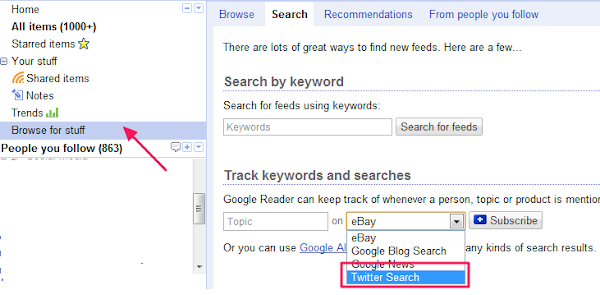
4) Archivist
Archivist is a desktop Twitter keyword tracking tool. After installation, just enter a desired keyword and you will be presented with a list of more than one thousand tweets containing that keyword. Furthermore, you can export that list of tweets and view it as an Excel document.
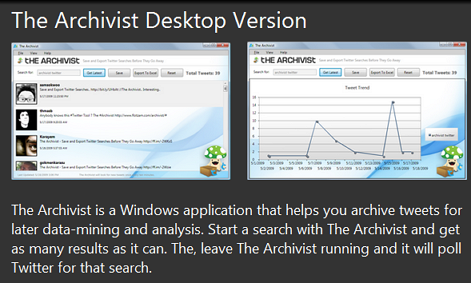
5) Twitter Clients
Most major Twitter clients like Tweetdeck and Hootsuite support tracking of multiple keywords. Depending on your personal preference you can choose one of these tools, and follow keywords in a stream.

6) Monitter
Monitter is a real-time Twitter search tracking tool. It is beneficial because it is very fast and you can add many columns, each one with a different set of keywords. In this way, you will be able to follow many keywords at once.

This is a guest post by Sandrina, web analyst and chief editor of Internet Zanatlija, a technology blog from Serbia.
You don't have to have a Twitter account in order to follow keywords on Twitter, but in some cases it is desirable. Let's have a look at some of the best ways to track Twitter search terms.
1) Twitter
Go to Twitter search, enter a desired keyword and follow its mentions. You can also refine your search results by using many criteria like people or places. If you have a Twitter account, you can even save your searches.
2) RSS feeds
All Twitter search terms can be followed via RSS feeds. Feed URL for the search term would be http://search.twitter.com/search.atom?q=giveaway. Here we have used the keyword giveaway, but you can replace it with any other keyword. You can also track two or more keywords by replacing the single keyword with two in the following manner:- http://search.twitter.com/search.atom?q=keyword1+keyword2.
3) Google Reader
For regular users of Google Reader, there is a very easy way to follow Twitter keywords. Go to Browse for Stuff - Search - Track keyword and searches, choose Twitter in the drop-down list, enter a keyword and click on Subscribe.
4) Archivist
Archivist is a desktop Twitter keyword tracking tool. After installation, just enter a desired keyword and you will be presented with a list of more than one thousand tweets containing that keyword. Furthermore, you can export that list of tweets and view it as an Excel document.
5) Twitter Clients
Most major Twitter clients like Tweetdeck and Hootsuite support tracking of multiple keywords. Depending on your personal preference you can choose one of these tools, and follow keywords in a stream.
6) Monitter
Monitter is a real-time Twitter search tracking tool. It is beneficial because it is very fast and you can add many columns, each one with a different set of keywords. In this way, you will be able to follow many keywords at once.
This is a guest post by Sandrina, web analyst and chief editor of Internet Zanatlija, a technology blog from Serbia.
4. Have a functional Website as your wallpaper
Wallpapers are probably the first thing which we get bored of in our
computers. Most of us have an image or Windows Dreamscene as wallpaper,
but instead of having them, why not stand ahead of the crowd and have a
functional website as your cool wallpaper in Windows?
All you need to do is:-
Maximize the small window that opens on desktop and your desktop will look like one in the image.
Try it on your PC and show it to your friends to impress them. They will be surprised to see this new type of wallpaper on your computer. I did this on my friend's PC and he was too overwhelmed with this that he could not even speak a word.
All you need to do is:-
- Right Click on Desktop.
- Go to Properties.
- Click on Desktop tab. Select Customize Desktop.
- Under the Web tab, click New.
- Type the complete URL in the URL tab including 'http://'.
- Click OK, OK and OK again to apply the changes.
Maximize the small window that opens on desktop and your desktop will look like one in the image.
Try it on your PC and show it to your friends to impress them. They will be surprised to see this new type of wallpaper on your computer. I did this on my friend's PC and he was too overwhelmed with this that he could not even speak a word.
5. Cool JavaScript Tricks: Edit Websites in Browser (Live)
Imagine a world
where you are a God and have ultimate control on what happens and more
importantly, how it happens. Seems too good a dream. Now it has come
true, at least for the online world.
 Using
this trick, you will be able to edit any webpage live in your browser
as if it was a Wiki and change the details according to your wish. Yes,
you read that right. You can edit Google or even Facebook
for that matter right in your browser and that too without requiring
any technical know-how or getting deep into hacking and cracking.
Using
this trick, you will be able to edit any webpage live in your browser
as if it was a Wiki and change the details according to your wish. Yes,
you read that right. You can edit Google or even Facebook
for that matter right in your browser and that too without requiring
any technical know-how or getting deep into hacking and cracking.
Here is an example picture demonstrating the Google Homepage edited by me to say that I own Google.
This is just an example. You can use it for anything like showing wrong traffic stats or for fooling people by showing that someone said something about them on Facebook or Twitter. It depends only on your creativity. But I would advise you to stay ethical and use it for entertainment purposes only.
(Mozilla Firefox does not support this. If you use Firefox, you can use the bookmarklets given at the end of this post. If you use Google Chrome and the code does not seem to work, precede it with "javascript:" without quotes.)
To use this trick, all you need to do is just copy the code given below and paste it in your address bar after you have opened the website you wish to edit. And start editing.
Or, alternatively you can use the following bookmarklets by dragging them to your Bookmarks bar.
The editing that you do will however be temporary as it is not server-sided. You can also save the modified website through your browser by File>Save. This works on all common web browsers including Chrome, Firefox, Opera and Internet Explorer.
Here is an example picture demonstrating the Google Homepage edited by me to say that I own Google.
This is just an example. You can use it for anything like showing wrong traffic stats or for fooling people by showing that someone said something about them on Facebook or Twitter. It depends only on your creativity. But I would advise you to stay ethical and use it for entertainment purposes only.
(Mozilla Firefox does not support this. If you use Firefox, you can use the bookmarklets given at the end of this post. If you use Google Chrome and the code does not seem to work, precede it with "javascript:" without quotes.)
To use this trick, all you need to do is just copy the code given below and paste it in your address bar after you have opened the website you wish to edit. And start editing.
javascript:document.body.contentEditable%20=%20'true';%20document.designMode='on';%20void%200You can capture a screenshot by pressing the Print Screen key or by using the Snipping Tool if you use Windows 7 or Windows Vista. If you wish to again make the website non-editable to give a more authentic look, copy and paste the code given below in the address bar after you are done editing (does not work in Firefox).
javascript:document.body.contentEditable%20=%20'false';%20document.designMode='off';%20void%200
Or, alternatively you can use the following bookmarklets by dragging them to your Bookmarks bar.
1. Edit this Website
2. Done Editing
The editing that you do will however be temporary as it is not server-sided. You can also save the modified website through your browser by File>Save. This works on all common web browsers including Chrome, Firefox, Opera and Internet Explorer.
6. How to Download Flash Videos in Computer and Mobile
More than 72 hours
of video content is uploaded to the internet per minute. With so much
video content being uploaded, people have felt the need to download
videos but most users don't have the tools to download Flash videos. So
what does a user do?
Well nothing, s/he just reads this article and learn the many ways he can use to download Flash videos.

Web's Video Format: Most websites use the FLV( Adobe Flash Video) format to display the various types of videos. The reason for this is that FLV files use comparatively less amount of storage space for the same video quality.
How to Play Flash Videos: To play FLV media in browsers, you need to have Adobe's Flash Player plugin installed. To play FLV formatted videos in your PC, you need to have a media player capable of playing FLV videos. VLC Media player is one such free media player which can easily play FLV files.(To download VLC Media Player and other essential software, visit 5 Essential free software for Windows PC.) Update: Not necessarily, modern web browsers that support HTML5 can play Flash videos by using the new HTML5 players.
Download Flash Videos via Internet Explorer: This technique uses copying FLV videos from Internet Explorer's temporary files cache. A temporary files cache is a collection of items which are stored on the disk to load them quickly without downloading them again. Not only Internet Explorer, but almost all browsers have a temporary files cache. But most of these browsers store the files in cache without any extension which leads to complexity in finding saved videos. On the other hand, Internet Explorer stores the file "as it is" in its cache. To download FLV Videos via Internet Explorer, follow the instructions given below:-
For Internet Explorer 6 and earlier versions:-
For Internet Explorer 7 ,8 and 9:-

Downloading FLV Videos via third party software: Due to the popularity of watching videos online, many third party companies have manufactured many software programs to download Flash videos. A simple web search containing "free software to download Flash videos" is likely to return a lot of such software.
Downloading FLV videos via Real Media Player: Real Media Player states that it is the best free media player available to play, manage and download all your mp3, flash and video files. I do not quite agree but still, Real Media Player offers a very good plugin with which you can download FLV videos easily. Whenever Real Media Player detects a flash video, it offers an option to download the video right on top of it.
Downloading Flash Videos in Mobiles: Mobile Users can use Bolt Browser to download FLV videos directly to their mobiles. Bolt automatically re-formats the video into a version supported by the mobile which can then be easily viewed. Update: Bolt Browser has been discontinued. Skyfire can also be used to download flash videos directly formatted according to your specific mobile.
Third Party Websites to Download Flash videos: There are many free third party websites on the internet which offer you to download FLV videos just by entering the URL of the video, selecting the format and clicking on the download button. Few such sites are:-
1. Keepvid: Keepvid allows you to download Flash videos in a wide variety of formats including .MP4, .3GP( high and low quality) and yeah, .FLV format.
2. SaveVid: SaveVid also offers downloading flash videos in various formats with the option of downloading them in different qualities.
3. Vixy: Vixy offers you to download FLV videos in .MP4 format, AVI format, .MOV for Macintosh, .3GP format for mobiles and .MP3 format for Audio Players.
So, that brings us to the end of this article. If you know some other ways to download Flash videos, feel free to send me an email and they will be included in this article.
Well nothing, s/he just reads this article and learn the many ways he can use to download Flash videos.
Web's Video Format: Most websites use the FLV( Adobe Flash Video) format to display the various types of videos. The reason for this is that FLV files use comparatively less amount of storage space for the same video quality.
How to Play Flash Videos: To play FLV media in browsers, you need to have Adobe's Flash Player plugin installed. To play FLV formatted videos in your PC, you need to have a media player capable of playing FLV videos. VLC Media player is one such free media player which can easily play FLV files.(To download VLC Media Player and other essential software, visit 5 Essential free software for Windows PC.) Update: Not necessarily, modern web browsers that support HTML5 can play Flash videos by using the new HTML5 players.
Download Flash Videos via Internet Explorer: This technique uses copying FLV videos from Internet Explorer's temporary files cache. A temporary files cache is a collection of items which are stored on the disk to load them quickly without downloading them again. Not only Internet Explorer, but almost all browsers have a temporary files cache. But most of these browsers store the files in cache without any extension which leads to complexity in finding saved videos. On the other hand, Internet Explorer stores the file "as it is" in its cache. To download FLV Videos via Internet Explorer, follow the instructions given below:-
For Internet Explorer 6 and earlier versions:-
- Make sure you are logged in as an administrator.
- Play the video of your choice in Internet Explorer.
- Go to Control Panel. Click on switch to classic view in the sidebar.
- Click on Folder Options.
- Click on View Tab and encircle "Show hidden files and folders".
- Go to My Computer.
- Click on your System Drive.(The drive containing your Windows files.)
- Click on Documents and Settings.
- Click on your User name.
- Click on Local Settings.
- Copy your Temporary Internet Files folder and paste it to your desktop.
- Search the pasted folder for "*.flv" without the quotes. And play the files to find your video. Copy your found video and paste it to the location of your choice.
For Internet Explorer 7 ,8 and 9:-
- Make sure you are logged in as an Administrator.
- Play the video of your choice in Internet Explorer.
- Go to Control Panel. Click on switch to classic view in the sidebar.
- Click on Folder Options.
- Click on View Tab and encircle "Show hidden files and folders", de-select "Hide protected Operating System Files" and de-select "Hide Extensions for Known Filetypes".
- Windows XP Users, follow the instructions given above for IE6 after Step 5.
- Windows 7 and Windows Vista users, navigate to your system drive.
- Navigate to Username\AppData\Local\Microsoft\Windows\Temporary Internet Files\
- Add "Low\Content.IE5" to the location in the address bar.
- There will be some folders with random alphanumeric names.
- Opening those folders would display a security message. Click Yes.
- You cannot search these folders so, you will have to look into them to find the video of your choice. (This can be simplified by selecting "Details View" and sorting the contents by size. Videos being of larger size would be at the top of the list.)
- Then copy the found video and paste it to the location of your choice.
- You can also copy those folders and paste them to your desktop. This will enable you to search them easily.
Downloading FLV Videos via third party software: Due to the popularity of watching videos online, many third party companies have manufactured many software programs to download Flash videos. A simple web search containing "free software to download Flash videos" is likely to return a lot of such software.
Downloading FLV videos via Real Media Player: Real Media Player states that it is the best free media player available to play, manage and download all your mp3, flash and video files. I do not quite agree but still, Real Media Player offers a very good plugin with which you can download FLV videos easily. Whenever Real Media Player detects a flash video, it offers an option to download the video right on top of it.
Downloading Flash Videos in Mobiles: Mobile Users can use Bolt Browser to download FLV videos directly to their mobiles. Bolt automatically re-formats the video into a version supported by the mobile which can then be easily viewed. Update: Bolt Browser has been discontinued. Skyfire can also be used to download flash videos directly formatted according to your specific mobile.
 |
| Charlie bit my finger. Most popular online Video |
Third Party Websites to Download Flash videos: There are many free third party websites on the internet which offer you to download FLV videos just by entering the URL of the video, selecting the format and clicking on the download button. Few such sites are:-
1. Keepvid: Keepvid allows you to download Flash videos in a wide variety of formats including .MP4, .3GP( high and low quality) and yeah, .FLV format.
2. SaveVid: SaveVid also offers downloading flash videos in various formats with the option of downloading them in different qualities.
3. Vixy: Vixy offers you to download FLV videos in .MP4 format, AVI format, .MOV for Macintosh, .3GP format for mobiles and .MP3 format for Audio Players.
So, that brings us to the end of this article. If you know some other ways to download Flash videos, feel free to send me an email and they will be included in this article.
7. 7 Wi-Fi Tweaks to Boost Your Speed
Chances are if you
have a wireless internet connection at your home, you have had some
trouble with the speed of the connection at least once before. That
being said, a slow wireless connection can be frustrating to deal with.
You are probably paying good money to your internet service provider, so
slow speed is something you should not have to deal with, right? Well,
the truth is wireless speed can be affected by a number of things.
Luckily there are some Wi-Fi tweaks you can try that should help boost
your speed and get you rolling in no time.
1. Reposition Your Router
The position of your wireless router plays a major role in the speed and strength of your wireless connection. If you are having trouble, you should try to reposition your router in a centrally located area, where the signal can equally reach each wireless device in your house. If your router is near an outside wall, try to move it closer to the middle of your house. Routers that are placed near outside walls can send some of the signal outside, which can risk your wireless connection’s strength and speed.
2. Purchase a Wireless Signal Repeater
Adding a wireless signal repeater to your home network can greatly increase the speed of your connection. A repeater works by extending your signal without having to add any additional wires. All you have to do is simply place the wireless repeater in a location that is between your router and your wireless device(s). It will instantly boost the wireless signal that is sent from the router to your devices, meaning faster speeds for you.
3. Install a New Antenna
Most wireless routers come standard with an omnidirectional antenna, meaning it broadcasts the wireless signal in a circular radius to reach various places in your home. If your router is in a perfectly centered location between all of your wireless devices, this is probably fine. But if your router isn’t perfectly centered among devices, you should think about replacing the existing antenna with a stronger one, known as a high-gain antenna. You can usually remove your old antenna and replace it with one of these stronger antennas to boost your signal strength, therefore increasing the speed of your connection. Another perk of a high-gain antenna is its ability to focus the wireless signal in any direction you prefer.

4. Use One Brand of Equipment
You may not think that using different brands of equipment can reduce the speed of your wireless connection, but in reality it can. If you use different brands of equipment, your components may not work as efficiently. This is because many manufacturers of wireless networking equipment pre-install enhancements in all of their products. These enhancements can boost speed, but will only work if products from the same manufacturer are used simultaneously. If you are using various brands of equipment and your speed is suffering, this is definitely worth a try.
5. Reduce Frequency Interference
Many household electronics, such as cordless telephones and baby monitors, run at the same frequency as wireless routers. This means that these electronic devices can interfere with the wireless signal that is being broadcast from your router, which can affect the speed and performance of your connection. Check the box of your router to see what frequency it runs at, and try to avoid using other electronic devices that operate at the same frequency. You can also try to change the channel on your router to avoid frequency interference.
6. Check for Firmware or Driver Updates Regularly
The manufacturers of wireless routers and network adapters often release firmware or driver updates that can improve the function of your wireless connection. You can find and download these updates at the manufacturers’ websites. Updates are usually done to fix issues, add features, and strengthen your equipment’s performance. Check for these updates on a regular basis to make sure your firmware and drivers are always kept up to date.
7. Secure Your Wireless Network
If your network is not properly secured, neighbors could be using your signal. This can reduce the speed of your connection because you are in a sort, sharing the wireless signal. Set up secure passwords and some sort of wireless encryption that will prevent anyone else from accessing your wireless network. All of these Wi-Fi tweaks can greatly boost the speed of your wireless connection. If one of them does not seem to do the trick, try another or even a multitude of options. It may take a little time and patience, but once you figure out what works to speed up your connection, you will be happy you put forth the effort.
1. Reposition Your Router
The position of your wireless router plays a major role in the speed and strength of your wireless connection. If you are having trouble, you should try to reposition your router in a centrally located area, where the signal can equally reach each wireless device in your house. If your router is near an outside wall, try to move it closer to the middle of your house. Routers that are placed near outside walls can send some of the signal outside, which can risk your wireless connection’s strength and speed.
2. Purchase a Wireless Signal Repeater
Adding a wireless signal repeater to your home network can greatly increase the speed of your connection. A repeater works by extending your signal without having to add any additional wires. All you have to do is simply place the wireless repeater in a location that is between your router and your wireless device(s). It will instantly boost the wireless signal that is sent from the router to your devices, meaning faster speeds for you.
3. Install a New Antenna
Most wireless routers come standard with an omnidirectional antenna, meaning it broadcasts the wireless signal in a circular radius to reach various places in your home. If your router is in a perfectly centered location between all of your wireless devices, this is probably fine. But if your router isn’t perfectly centered among devices, you should think about replacing the existing antenna with a stronger one, known as a high-gain antenna. You can usually remove your old antenna and replace it with one of these stronger antennas to boost your signal strength, therefore increasing the speed of your connection. Another perk of a high-gain antenna is its ability to focus the wireless signal in any direction you prefer.
4. Use One Brand of Equipment
You may not think that using different brands of equipment can reduce the speed of your wireless connection, but in reality it can. If you use different brands of equipment, your components may not work as efficiently. This is because many manufacturers of wireless networking equipment pre-install enhancements in all of their products. These enhancements can boost speed, but will only work if products from the same manufacturer are used simultaneously. If you are using various brands of equipment and your speed is suffering, this is definitely worth a try.
5. Reduce Frequency Interference
Many household electronics, such as cordless telephones and baby monitors, run at the same frequency as wireless routers. This means that these electronic devices can interfere with the wireless signal that is being broadcast from your router, which can affect the speed and performance of your connection. Check the box of your router to see what frequency it runs at, and try to avoid using other electronic devices that operate at the same frequency. You can also try to change the channel on your router to avoid frequency interference.
6. Check for Firmware or Driver Updates Regularly
The manufacturers of wireless routers and network adapters often release firmware or driver updates that can improve the function of your wireless connection. You can find and download these updates at the manufacturers’ websites. Updates are usually done to fix issues, add features, and strengthen your equipment’s performance. Check for these updates on a regular basis to make sure your firmware and drivers are always kept up to date.
7. Secure Your Wireless Network
If your network is not properly secured, neighbors could be using your signal. This can reduce the speed of your connection because you are in a sort, sharing the wireless signal. Set up secure passwords and some sort of wireless encryption that will prevent anyone else from accessing your wireless network. All of these Wi-Fi tweaks can greatly boost the speed of your wireless connection. If one of them does not seem to do the trick, try another or even a multitude of options. It may take a little time and patience, but once you figure out what works to speed up your connection, you will be happy you put forth the effort.
8. Should You Be Interested in Cloud Computing?
The expensive cost
of hardware and software drives up infrastructure and operation
(I&O) expenses for most businesses. Many businesses are looking for
different strategies to help cut down the I&O expenses. One of the
fastest growing technology trends that can potentially reduce I&O
expenses for businesses is cloud computing.
Save money with "Pay-as-you-go"
Cloud computing adopts a "pay-as-you-go" model, which allows business to pay only for the storage capacity that they use. This model provides very little up-front cost compare to setting up and maintaining an in-house infrastructure. Businesses can start out by renting a small amount of storage, and then increase the storage capacity as required. The idea behind the "pay-as-you-go" model is to allow businesses to adopt cloud computing quickly. Businesses will see an immediate return on investment (ROI) after migrating their infrastructure to the cloud.

Save money with "Outsourcing"
For maximum cost savings, most businesses will outsource most of their infrastructure components. By moving their infrastructure to the cloud and hosted by third-party cloud providers, businesses will experience a tremendous decrease in operation cost associated with IT staffing and hardware maintenance. Traditionally, businesses require a high number of IT professionals to take care of the day-to-day infrastructure maintenance such as installation, upgrades, and continuous enhancements. The number of IT staffs can greatly be reduced as more infrastructures are moved away from the traditional model and into the cloud.
Migrate to the cloud only when it makes sense
 Cloud
computing offers a wide range of solutions that include
Infrastructure-as-a-Service (IaaS), Desktop-as-a-Service (DaaS), and
Software-as-a-Service (SaaS). The technology department is responsible
for evaluating which one of these three components should be adopted
based on the business requirements. For example, IT needs to determine
the number of users that require desktops, the number and type of
software applications, and the infrastructure components that are
currently supported by the cloud. Businesses also need to research and
evaluate the different cloud providers and cloud solutions. Standard
office applications such as word processing, spreadsheets, and
collaboration tools are offered by Microsoft Office 365 or Google Apps.
Cloud
computing offers a wide range of solutions that include
Infrastructure-as-a-Service (IaaS), Desktop-as-a-Service (DaaS), and
Software-as-a-Service (SaaS). The technology department is responsible
for evaluating which one of these three components should be adopted
based on the business requirements. For example, IT needs to determine
the number of users that require desktops, the number and type of
software applications, and the infrastructure components that are
currently supported by the cloud. Businesses also need to research and
evaluate the different cloud providers and cloud solutions. Standard
office applications such as word processing, spreadsheets, and
collaboration tools are offered by Microsoft Office 365 or Google Apps.
Another requirement that businesses should carefully evaluate is the mandatory federal and state regulatory and compliances. A financial institution will have stricter compliances to follow than a software development firm will. The reason for this is that financial institution contains more sensitive data than other type of businesses. As a result, financial institutions will have stricter guidelines when it come to moving their data to the cloud.
Less power equals more savings, and the go green factor
Whether the cloud is internally hosted or outsourced to third party cloud providers, businesses will save money on energy either way. Cloud computing is much more energy efficient because there are fewer servers and network equipments that are required to operate. In addition to saving energy costs, businesses are also contributing to a healthier planet by leaving a smaller energy footprint.
Save money with "Pay-as-you-go"
Cloud computing adopts a "pay-as-you-go" model, which allows business to pay only for the storage capacity that they use. This model provides very little up-front cost compare to setting up and maintaining an in-house infrastructure. Businesses can start out by renting a small amount of storage, and then increase the storage capacity as required. The idea behind the "pay-as-you-go" model is to allow businesses to adopt cloud computing quickly. Businesses will see an immediate return on investment (ROI) after migrating their infrastructure to the cloud.
Save money with "Outsourcing"
For maximum cost savings, most businesses will outsource most of their infrastructure components. By moving their infrastructure to the cloud and hosted by third-party cloud providers, businesses will experience a tremendous decrease in operation cost associated with IT staffing and hardware maintenance. Traditionally, businesses require a high number of IT professionals to take care of the day-to-day infrastructure maintenance such as installation, upgrades, and continuous enhancements. The number of IT staffs can greatly be reduced as more infrastructures are moved away from the traditional model and into the cloud.
Migrate to the cloud only when it makes sense
Another requirement that businesses should carefully evaluate is the mandatory federal and state regulatory and compliances. A financial institution will have stricter compliances to follow than a software development firm will. The reason for this is that financial institution contains more sensitive data than other type of businesses. As a result, financial institutions will have stricter guidelines when it come to moving their data to the cloud.
Less power equals more savings, and the go green factor
Whether the cloud is internally hosted or outsourced to third party cloud providers, businesses will save money on energy either way. Cloud computing is much more energy efficient because there are fewer servers and network equipments that are required to operate. In addition to saving energy costs, businesses are also contributing to a healthier planet by leaving a smaller energy footprint.
9. Wirelessly Transfer Files on Android Devices With Dropbox
As great as smart
phones have become when it comes to handling our digital lives, there
are still a few tiresome concessions we make for their use. One is
having to plug our device into our computer in order to transfer files.
Some manufacturers such as Apple have launched new services to alleviate
that using cloud computing. Here is one way you can send files to your
Android based phone completely free without the help of a USB cable.
Step 1: On your computer, navigate to dropbox.com and download the application installer.
Step 2: Once the application has been downloaded, run it and an initial set up wizard should begin.
Step 3: Using the initial set up wizard, create a Dropbox account by entering your name, email address and computer name.
Step 4: A folder called Dropbox should now be available on your computer. Put any file you wish to wirelessly send to your phone in this folder.
Step 5: On your Android phone, open your App drawer and open the Market application.
Step 6: Search for Dropbox and install the application.
Step 7: Once installed, return home and re-open your App drawer and start up the Dropbox app.
Step 8: Tap the existing Dropbox account button and log in using the account you just created in step 3.
You should now see any files you have in the Dropbox folder. Transferring additional files to your phone wirelessly is now as easy as dragging them into the folder and starting the app on your phone. Dropbox allows you to send up to 2GBs of data for free. Any files larger than that will either have to be transferred via hard connection or you’ll have to sign up for a 50 or 100 GB plan.
 |
| Transferring files wirelessly on Android using Dropbox is easy |
Step 1: On your computer, navigate to dropbox.com and download the application installer.
Step 2: Once the application has been downloaded, run it and an initial set up wizard should begin.
Step 3: Using the initial set up wizard, create a Dropbox account by entering your name, email address and computer name.
Step 4: A folder called Dropbox should now be available on your computer. Put any file you wish to wirelessly send to your phone in this folder.
Step 5: On your Android phone, open your App drawer and open the Market application.
Step 6: Search for Dropbox and install the application.
Step 7: Once installed, return home and re-open your App drawer and start up the Dropbox app.
Step 8: Tap the existing Dropbox account button and log in using the account you just created in step 3.
You should now see any files you have in the Dropbox folder. Transferring additional files to your phone wirelessly is now as easy as dragging them into the folder and starting the app on your phone. Dropbox allows you to send up to 2GBs of data for free. Any files larger than that will either have to be transferred via hard connection or you’ll have to sign up for a 50 or 100 GB plan.
